Picking your brand colors

Do colors really mean anything for your brand? I mean it’s just colors, right?

WRONG! There is a whole lot of research done behind the meaning of colors!

When you think of your ‘Brand Identity’ what does that mean to you?

Personality is the emotional, and human, association to a brand. Identity is the image created and used by a company to relate to consumers. An identity can include all forms of communication and visuals such as logos, colors or fonts. But the two are symbiotic. A brand’s identity should be part of its personality.

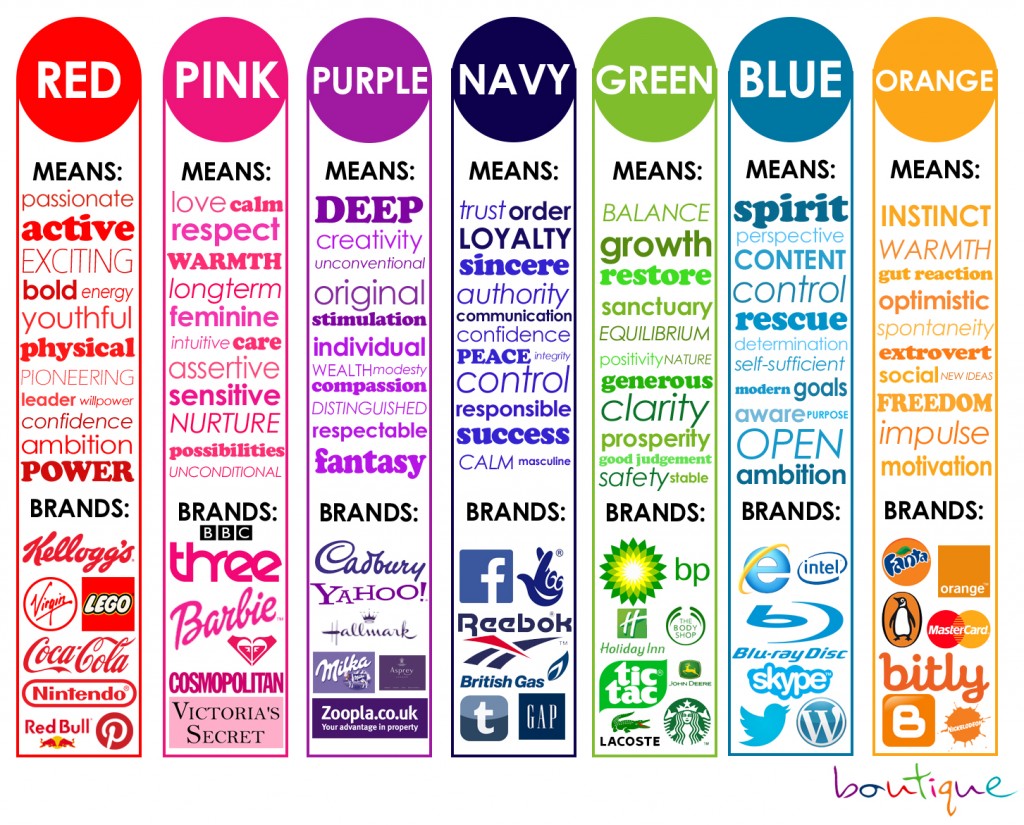
This is one of our favorite color meaning charts: Attribution http://blog.visme.co/color-psychology-in-marketing-and-brand-identity-part-2/  

When you talk about creating a brand it all starts with the colors, fonts,  and styles.

Here are a few steps to get you started

  1. Mood Board Inspiration
    *Types of things that inspire you: Colors, Styles, Textures, Images, Fonts. Pinterest is a great free resource to look at types of brands you like.
  2. Color Palette & Fonts
    What color makes you happy? What’s your favorite color?
    – Which colors and fonts are you naturally drawn towards?
    – Are there certain colors that can represent your design niche the best?– Which colors would you prefer to avoid?
    -Are there certain colors that can represent your design niche the best?
    -What do I want the identity of your business to say to my clients?
  3. Primary Logo
    Primary Logo is: Do you have one? Do you have a stacked logo for social media?
  4. Social Media & Marketing Graphics
    What social media platforms do you have, that you need to make sure your graphics are correct?
  5. Website & Consistency – Keep your brand’s tone and personality consistent across channels

Is your brand identity unique?
Does it have passion behind it?
Is it consistent?

What are brand colors

WRONG! There’s a whole lot of research done behind the meaning of colors!

When you think of your ‘Brand Identity’ what does that mean to you?

Personality is the emotional, and human, association to a brand. Identity is the image created and used by a company to relate to consumers. An identity can include all forms of communication and visuals such as logos, colors or fonts. But the two are symbiotic. A brand’s identity should be part of its personality.

This is one of our favorite color meaning charts: Attribution http://blog.visme.co/color-psychology-in-marketing-and-brand-identity-part-2/  

When you talk about creating a brand it all starts with the colors, fonts,  and styles.

Here are a few steps to get you started:

1. Mood Board Inspiration


What’s a mood board?

It’s a collection of different items that can help you get a feel of what your brand is all about. It can contain images, textures, patterns, typefaces, and other design elements. You may even put together a mood board with logos, website, images that you like the feel of to maybe replicate.

How to make an effective mood board:

Don’t set limits.

The moment you start making a mood board, understand that this is not a place for you to hold back. Put as many elements into it as possible. Remember that it’s always easier for you to take out elements that do not work out in the end. But if you hold back, you might miss out on things that you could have added, but thought twice about

Be detailed and specific.

Sometimes, you would add an image that struck you because of a specific element. A screenshot of a webpage perhaps, or a poster you found online. You may like the font used, or the color scheme applied. In these cases, make sure you add notes that specify what you liked about the image. This way, you can remember which element you should be zooming in on when you encounter the image in your board.

2. Color Palette & Fonts

Your brand identity is not just a logo of your business, but a reflection of your personality. When it comes to creating your brand, color plays a vital role in the process. People choose brands, make buying decisions, change their actions, choose what stores to go into, all because of COLOR, and they may not know they even do it!  

Think of a stop light, you always know Red means stop, Green means Go and Yellow means caution or slow down, right? This changes the way we think about colors and what they mean to us as individuals. At the end of the day, Color is EVERYTHING! These colors will be in your logo, website, social media, print materials, publications, promotional items and so much more, it’s important you take your time and really think about this.

What color makes you happy? What’s your favorite color?
– Which colors and fonts are you naturally drawn towards?
– Are there certain colors that can represent your design niche the best?– Which colors would you prefer to avoid?

-Are there certain colors that can represent your design niche the best?

-What do I want the identity of your business to say to my clients?

3. Logos

  • Primary Logo—Size and Scaling The logos are all saved to paths—which means they are rendered as vector art and can be continuously scaled. When changing the size it is important to do this proportionally and not stretch the art or change the original proportions. The logo shall not be used below the minimum size shown below
  • Primary Logo—Color Usage The primary logo may be used in four different color combinations as shown below. The logo should never be used in any other color combinations other than those specified below.
  • Secondary Logo The secondary logo was created for situations where Highline is more of an endorsement or equal party. It can be used in situations where there is limited space or where the full name is not necessary. It may also be interchanged with the main logo if the name Highline Community College is stated elsewhere.
  • Secondary Logo—Size and Scaling Like the primary logo, the secondary logo is saved to paths—which means they are rendered as vector art and can be continuously scaled. When changing the size it is important to do this proportionally and not stretch the art or change the original proportions. 

Do you have one? Do you have a stacked logo for social media?

4. Social Media & Marketing Graphics

When you are creating all these graphics, it’s so important to make sure you have the right size for each social media platform, cheat sheet here http://www.visualistan.com/2016/12/the-2017-social-media-image-sizes-cheat.html


What social media platforms do you have, that you need to make sure your graphics are correct?

5. Website & Consistency 

When communicating as the brand offline or via your website, social media profiles, or other online channels, it’s important to keep a consistent tone and personality. If your brand is fun and friendly on Twitter, it should have a similar flavor on Facebook and LinkedIn. Your messaging on LinkedIn may be less casual or more professional, but it shouldn’t sound like it’s coming from a different brand altogether. Think about it this way: there is the “at work” you and the “at home or with friends” you. Your personality is the same, but your mannerisms adjust to the context. The same goes for your brand personality and selected communication channels.

Is your brand identity unique?
Does it have passion behind it?
Is it consistent?

optimize email marketing

I’ve always had a touch and go relationship with our email list. Right out the gate I added every business card I received to my list, but soon the email frequency dwindled and ultimately died when I found that I didn’t have enough content to share! Soon a year passed, then I jumped back into sending emails followed by another 2 year hiatus. Each time I started sending emails, I received positive feedback from my list, increased traffic, and most importantly, new sales. the downfall was that I also alienated individuals because they simply forgot who I was. Learning from my years of wasted opportunity using my email list, I’ve learned some very valuable lessons that can help you kick start your email marketing most effectively.

Below I’ve outline the 4 steps to email marketing: Building your list, Writing your email, Optimizing your subject line, and Mistakes to avoid. You’ll notice as you read through that subject lines and consistency do appear most frequently in these steps. Being consistent is half the battle and once you have an email marketing program in place, optimizing your subject line can have the biggest effect on the open rate and sales from your emails.

STEP 1: Building your Email List

While everyone is focusing on building a strong social media presence, others tend to forget about the importance of email.

Your email list plays a big role in your marketing campaign. It can help you build relationships with your target audience, generate buzz about your business and attract new customers. That said, it makes sense to continuously grow your email contacts.

Interested to grow your email list and grow your subscribers? Then you came to the right place. In this blog post, we’ll be sharing with you some effective strategies on how to get more email subscribers. Follow the tips below to get your first 1,000 subscribers.

Place a subscription box on every page of your website

Most website owners think that people would first access the home page before navigating through the site. But that’s not always the case. They may check your products, scroll through the “about us” section or any other page on your site. You can use your website to generate more contacts by adding a subscription form where your visitors can sign up. Be sure to place the form at the top of the page to make it easier for people sign up. Survey revealed that sites that place sign up boxes as part of their top banner perform better as compared to those located at the footer area. In order to get people to subscribe to your newsletters, make sure your sign up box is a prominent feature of your website. The more visible it is, the more subscribers you’ll get.

As a marketer, you need to answer the question most people ask: Why would I subscribe to your email list if I can just follow you on Facebook? To urge people to subscribe to your newsletters, let them know that you offer subscriber-only content. Also, don’t forget to mention how often they’ll be receiving emails. Setting expectations upfront helps reduce unsubscribe rates.

Tip: I’ve decided upon ConvertKit as my go-to list building tool. It is a very straightforward interface to create forms, landing pages, incentive downloads, and corresponding sequences. Additionally, there is quite robust tracking, a definite plus! You can learn more about ConvertKit Here (*affiliate link).

Content is king

You won’t have a hard time getting people to sign up for email updates if you have great content on your site. As a marketer, it is your responsibility to constantly supply your readers with fresh, relevant and informative content. The best marketers for your products or services are the people who are already using them. For subscribers who have been on your list for a very long time, a discount or a small incentive would get them talking. Encourage them to share your list with their family and friends.

In Practice: Don’t just assume that you can’t reuse your blogs, correspondence with clients, or recent presentations. ALL of these have the potential to make in-depth content that can then be shared as resources, email campaigns, social media posts, videos, etc. Check out this guide on Repurposing Content as it can save you time and energy as you increase your online exposure. 

Social networks

Another way to build your list is by using social networking sites like Facebook and Twitter. Due to the viral nature of Facebook, it pays to add a subscription form on your page. Be sure to include a sign up link to your email list on the “About” section of your page. For an added boost, you can also add it on your personal account and tell your family and friends about it.

Offer an incentive

People love receiving free stuff. If you can give them something like a free trial of one of your products, a free ebook with useful information or access to an exclusive video, you’ll make an impact to your target audience. When done correctly, it can help you build a relationship with your audience and grow your email list.

Your offer should be interesting enough to your ideal customers. Find out more about your target audience and know what’s keeping them up until 3:00 am.

In Practice: My main incentive offer is our Free Resource library. You can get to this a few ways – either the link in our navigation or from the home page. Making this very obvious for site visitors increases the number of new email subscribers you can receive from your website.

Run a contest

Social media contests are one of the most effective ways to get email addresses from folks who want to hear from you. You are free to hold whatever contest and on any social media channel you want. But since majority of the adult population has a Facebook account, you might want to start there. Also, ask people to enter their email address in order to participate.

STEP 2: Writing your Content

Tips to write better email | write better email marketing for business

You’ve spent a significant amount of time writing an email that people will hopefully open and read. You’ve racked your brains for the best subject line. You’ve polished each sentence. Now, you’re finally ready to hit “send”. For some reason, you aren’t effectively grabbing the attention of your audience. You’re not getting a response from them either.

This blog post looks at strategies to help you craft an effective email marketing copy that converts. Follow these tips to ensure that your email is effective, clear and successful.

Write a meaningful subject line

Most professionals receive 50 to 200 emails a day. With that volume of email, it can be easy to overlook some important messages. If you want your email to be opened and read, then write an informative subject line that will give recipients an idea about the content of the email.

A clear subject line will capture the attention of the receiver and give busy professionals a concrete reason to read the message. Take a moment to write a subject line that accurately describes the content before you hit “send”.

A newspaper headline has 2 functions: 1. it sums up the content of the article; 2. it captures people’s attention. Based on this headline, you can decide whether or not you want to read the article. Your email’s subject line should also do the same thing.

If you have a very short message to convey and can include all the information the person need in the subject line, even better.

Struggling to write a subject line? I recently wrote a post with tips to create an award winning headline here

Keep it simple

People are more likely to read short and concise emails. Keep messages clear and brief. Use as few words as possible, but make sure that it contains all the important information. Also, focus on one particular subject per email. If you need to talk about a separate topic, then write another email.

We’re all busy. And if someone opens your email, this is your chance to get the message across. Don’t ruin it with poor content.

No one wants to read a long, ambiguous email. So get to the point and keep your word count low. Also, use simple English and steer clear from technical lingo.

Be personal

Just as you would in a letter, it is polite to add a salutation before jumping straight into the text of the email. But be sure to address the person appropriately.

If you are sending an email to a prospective client, then you want to address him as Mr. Johnson. Meanwhile, if you are writing to a friend, starting the email with Dear Mr. Johnson would be too formal. In this case, “Hi Bob” is the best way to go.

Email is usually the way professionals communicate, but that doesn’t mean that you should sound like a legal document or a spammer. The content should feel as if it came from actual human being, not a machine. While it’s good to keep the message short and brief, including a personal note can help warm up the conversation.

Tip: Back to ConvertKit (or any other CRM).. make sure that you are trying to capture both the first name and email address of your subscribers. Then, whenever possible, use the NAME embed code to automatically personalize your emails. 

Proofread

Your emails are a reflection of your attention to detail, values and professionalism. The last thing you want is to send an email that contains embarrassing spelling mistakes, horrible grammar mistakes, lack of proper greetings or one that is written in bright colors. Make sure you edit and proofread your email for grammar, spelling and punctuation mistakes before sending it.

STEP 3: Increase your Open Rate

Tips for businesses to increase open rates with email marketing

Email marketing is considered as an important part of a business’ marketing campaign. It has one of the most effective ways to engage with your prospects and customers. Plus, it provides the highest returns on investments.

Open rates give you an idea as to how your campaign is doing. If the open rate for your email program is better than the average, then good for you. But if your open rates are getting worrisome, you might want to look for ways to improve it.

Here are some easy ways to increase your email open rate.

Create an interesting subject line

If there is one opportunity to convince recipients to read the email, it is the subject line. After all, it is the first thing they see on any email. Your subject line must be clear and concise. It should tell readers what to expect from the email.

A good subject line is the key achieving better open and response rates. Since most people receive several emails in one day, they only need a few seconds to decide whether or not they’re interested to read the email. If your subject line is not interesting enough, people are less likely to read it. Also, make sure that your subject line is short enough that recipients will be able to read it at a glance.

Make it personal

You’ve spent so much time collecting people’s first name and email address, now is the right time to put them to use. Personalization has been proven to drive engagement and convert more leads. It is also a good idea to send your emails from a person or an employee, rather than from the company.

Studies show that subject lines that contain the first name of the subscriber boosts open rate every time. This is a subtle trust builder and an instant attention grabber. Make sure you personalize subject lines with first names.

Timing is key

Timing is everything in marketing. If you send emails too early in the morning or too late at night, they can get lost in the shuffle of other emails. If you send it too late in the afternoon, they may decide to put off reading until the morning since they might be too busy accomplishing some tasks before going home. The best time to send emails is during lunch or after work, when you know they’re reading.

If your campaign has a B2C focus, your audience may have time to check their emails after work or during lunch break. If you are running a B2B campaign, it might be best to send emails early in the morning or in the afternoon. Your goal is to send an email exactly when the recipients are checking their inbox.

In Practice: Honestly, every business and every tribe is different. You may find that your emails with promotions receive the highest open rates on Tuesday’s, but your newsletters sharing blog posts have the highest open rate on Sunday’s. One recent study stated that Friday emails had the highest open rate, but Saturday emails had the most conversions. MailChimp has another study that states Tuesday and Thursday are the best to send emails. It really just depends on your market and your promotions. Don’t be afraid to play around with different days of the week and times of day. 

Be consistent

Send too frequently and you may end up losing subscribers. Send too infrequently and you may cause your readers to stop interacting with your email. Send your emails at a consistent frequency to build your email reputation. A good rule of thumb is to send no less than 1 email a month and no more than 1 email a week unless it is for a specific promotion.

Clean up that dusty old email list

Most businesses are so determined to expand their email list that they tend to ignore the open rate. It doesn’t matter if you only have a small mailing list, as long as it is filled with engaged subscribers. It’s a good idea to remove inactive subscribers periodically.

STEP 4: Email Mistakes to Avoid

Email marketing mistakes to avoid for small business

Email marketing isn’t dead. In fact customer acquisition has quadrupled over the past 4 years. This goes to show how effective email marketing is for small businesses. That’s great news, provided that your emails are being read by the recipients.

In order to make sure that you’re getting the most out of your marketing efforts, you have to focus on what’s killing your open rates and find a way to fix them. While some mistakes are harmless, the following mistakes could be costly.

Poor frequency

While a flood of emails may distance the customer you’re trying to attract, the same reaction can also be expected if you send emails on an inconsistent basis.

Have a consistent enough cadence that your subscribers would be thrilled to receive an email from you, yet relaxed enough that they don’t wonder whether or not you’re still sleeping at night.

Forgetting to send emails at important events

The introduction of new products or services, promotions and events your business will be holding are some examples of email worthy announcements. If you have an important event to cover, make it a point to create a multi-email campaign around it.

Tip: I always recommend clients put together a content calendar as a way to visualize their entire year. In our model, as presented in Blogging Your Business, your blog is at the center of your marketing efforts. You want to make sure your blog posts are Timely, Relevant, and Authentic. This content then can be shared across all of your other marketing efforts from social media to email marketing, and even offline presentations. Creating the content calendar keeps you aware of external events and holidays that can affect your business. 

Poor subject lines

Subject lines are your first impression to every email recipient. They have to be clear enough that people know why you’re sending an email, short enough that they fit the screen of tablets and smartphones and enticing enough not to give away the entire email. Also, be cautious about using words and phrases that could mark your email as SPAM.

Unreliable email list

Whether you’re emailing inactive subscribers, not removing hard bounces or collecting bad data, having an unreliable email list can affect your open rates.

The key to a successful email campaigns is clean data. Make sure that all customer information is valid and up to date. Hard bounces should also be removed from your database.

Additionally, 43% of email recipients click the spam button based on the sender email address and name. So, it’s extremely important that the recipient knows who you are and are expecting to receive emails from you.

Optimize email marketing | Email marketing tips | How to use Email Marketiing | Email marketing for business


video marketing getting started

This guide from Animoto breaks things down to show you how easily (and quickly) you can get started with video.

Intimidated by video marketing? Animoto has broken things down so you can easily and confidently start promoting with video.

Download the free guide to learn why video marketing is essential and how to determine your video marketing objectives and goals. You’ll find inspiration for video ideas from 5 real-life businesses, tips for shooting, editing, distribution, and more.

So what types of business videos can you create?

We recommend creating Brand Videos, Expertise Videos, Product Videos, and Ad Hoc Videos.


Download Video Marketing Guide

How to get more twitter followers

This resource originally was published by Hubspot.

So you’re new to Twitter. You’re in the right place. But first, it’s important to understand why your followers matter for driving engagement with your business online.

When someone follows you on Twitter they are opting-in to see your Tweets. They’re the ones who will see what your company is like, what you company offers, and what your company thinks is interesting. They’re also the people that are likely to become brand advocates and will be engaging with your content through likes, Retweets, and mentions.
Getting followers isn’t really your end goal. Your end goal is to get people to engage with your Twitter content, thereby engaging with your business, and eventually becoming loyal customers.

When you gain followers on Twitter, it helps you get more customers. And it works! In a Small Business Customer Insight survey, Twitter found that 75% of customers feel more positively about a business after following them on
Twitter, and 69% of customers said they have purchased from a SMB after following them on Twitter.

This Ebook, published by Hubspot, covers the steps for you to take as you build and grow your Twitter Following.

Click Here to Download Ebook

Blogging in 2017

Ahh! Run for the hills, blogging is dead!

Wait, what? After all this work blogging every day for 2 months, I’m now saying blogging is dead? Let’s step back a moment.

There is always someone talking about social media being dead or blogging being dead, but the truth of the matter is that even if one strategy isn’t working as it used to, another strategy jumps in and takes its place.

Let’s take a look at blogging.

[Disclaimer: I do not think blogging is dead. It has absolutely changed in the past year or two years, but doesn’t everything shift, change, and get better over time?]

In 2015, Hubspot reported ideal blog lengths. The report stated that:

  • Shorter is better for blogs. In fact, Forbes even published an article stating “After 750 word — or sometimes after only half that — you risk losing your readers’ attention.” [Source]
  • Most posts on WordPress were only 280 words long.
  • In general, however, for this short blog post strategy to work, you needed a large network and needed to post frequently. In essence, your blog feed started looking more like a social media account news feed.
  • Around this time, articles also started popping up that stated blogs under 750 words received the most shares, whereas blogs over 1,200 or 1,500 words ranked the highest organically.

Blogging in 2016

As the months passed, this shifted drastically! By early 2016, it started becoming clear that not only was content still king, but LONG content reigned top. The longer the content, the more shares and inbound links you would find. But, it wasn’t just articles 1,500 – 2,000 words long. We were now talking 3,000 – 10,000 words long!

Shares by Content Length


What this means is that even though in 2015 bloggers were posting short blogs frequently, they were overlooking the importance and response they could get by going more in depth in a topic. Most bloggers weren’t taking the time to go into depth about their topics. The surge in shares for pieces of content that were between 3,000 – 10,000 words went against older common sense that people would lose interest in longer articles. The truth was that these longer articles actually capture more of the reader’s attention!

Looking back at 2015/2016 it actually was that bloggers didn’t want to spend the time going into depth.

During this time, as well, Medium.com completed a study on the optimal post length to capture a reader’s attention. Not surprisingly, considering the data we’ve already reviewed, the best length was approximately 7 minutes, or  between 1,500 and 1,750 words. Again, however, we see the same trend that a majority of posts on Medium represent 3 minute reads. These 3 minute reads were viewed the most frequently, because there are more of them, but the best length for engagement was at the 7 minute mark.

Total Engagement or Time on Article

Total Views By Post Length

Okay, so it is pretty clear from this data that blog posts generally have been getting longer and readers tend to enjoy this longer content. We see this in not only the time people stay on a longer article, but also the number of times longer content is shared and the organic rankings of longer content. This is still all in the past, however!

Let’s jump to 2017, what can we do now to make the optimal blog post?

Researchers are still pointing at longer blog posts and unfortunately tend to reference older data to stake their claims. There are, however, some incredible insights about what this data now means!

In 2017 long form blog posts are where you need to be. It is more difficult for some people to create this content than others, but if you are hoping to use blogs for SEO and to appeal to clients, you need to make sure that a majority of your blogs are over 1,500 words and at least a few blogs every month are in the 3,000 to 5,000 word range.

Why is this?

As you write more in depth on a topic, you are utilizing more related keywords. Google and other search engines are able to pick up on these related keywords and understand the topic you are talking about more clearly. Think about it… the longer your content, the more words you use, and the more likely the words you are using relate to one another.

You want to be mindful about these related long tail keyword phrases you are using.

One way to double check your work as it comes to long tail and related keywords is to simply turn to Google.

Let’s say your keyword was Search Engine Optimization. Type this into Google. The text box automatically pulls up other keywords people often search for. Here we see definition, how to do, techniques, etc.

search engine optimization related words

These words and others also appear at the bottom of the search results page. Just scroll all the way to the bottom and you will see a section titled “Searches related to search engine optimization”.

How to use Related Keywords

Each of these words can make great long tail keywords to include in your content. You can also get a sense of what spin you should take in your writing. Are people looking for how to’s and tips or for more informative background or even specific products relating to your content?

Include media embedded in your longer blogs to make them more shareable.

Longer pieces of content also tend to have more media inserted. Blog posts with at least one image tend to outrank and be shared more than those with no image.

When you have a longer piece of content, you also have more opportunities to insert images, videos, and podcasts. Each of these then may appeal to one individual or another. Take the time to build graphs, infographics, and other imagery that can help your content stand out.

Internal and External Links in longer blog posts for SEO

Additionally, writing longer content creates more opportunities to increase your internal linking and provides more incentive for external websites to link to your content. As you are writing, you are showing your expertise and knowledge on your subject. As you write, be sure to add links to other blog posts you’ve written. These longer blogs also create an opportunity for yourself to then highlight an eBook or freebie on your site.

Longer blogs create prompts for additional content on your site.

Often times, a longer blog post actually works very well as a starting point for your marketing for webinars and products. When you write the blog you are cultivating the information that can then be shared through different avenues. You are better able to repurpose your information that appears in the blog post.

To repurpose content, start with your blog post. This information can then be expanded upon in an eBook, which can be used to collect email addresses. Your email newsletter then in turn works as an avenue to share additional blog posts that are on information related to the eBook.

From here, you can measure which topics get the most response from your own market. These topics that get the highest engagement rates, then provide the basis for more in depth blog posts, eBooks, webinars, and finally products that you can sell online (or in person). Each blog post should also be shared on social media, as LinkedIn articles, and through sites like Quora and Medium.

Through repurposing the content you are building even more links between pages and reaching even more individuals.

2017 how to increase seo | Blogging | Blogging and search engine optimization | How to use blogging for SEO | Search Engine Optimization in 2017 | SEO | SEO 2017 | State of industry with blogging

Lastly, we need to look at where the industry is heading.

In the future, I don’t think studies of blogging will only measure effectiveness based on how many words appear in an article. Recent trends show that it is becoming increasingly important to include video and audio in blog posts. My hypothesis is that the research on blogging effectiveness is going to shift to measure the effectiveness of having these more personal elements. This unfortunately means a lot of us are going to have to step out of our comfort zone!

If you take a moment to consider how we choose to work with certain businesses and individuals, it really boils down to us knowing, liking, and trusting the person. Video is such an incredible way to tell people who we are and to show our personality.

As a Recap

  1. In the past, shorted blogs worked well for business
  2. Businesses and bloggers still tend to write these shorter posts, but need to dive into more detail
  3. To run an effective blogging program, you need to write posts that are 1,000-5,000 words long
  4. In these long posts, be sure to include Related Keywords, link to other blogs on your site, and share the posts to your other networks and email list
  5. Base eBooks and freebies on your site on content repurposed from your long blog posts as a way to manage your time more effectively
  6. Start stepping out of your comfort zone and include audio and video in your blogs posts in addition to images and infographics

Apparently, Google uses about 200 factors to rank a site. This can seem intimidating for those who just launched their website and are looking for ways to improve their search engine ranking. But here’s the catch. Not all of these factors do affect your SEO ranking. In fact, some of them are nothing but speculations.

As a business owner and digital marketer, it pays to pay attention to the things that really matter.

Here are 4 factors that do not directly affect your search engine ranking.

Social media presence

We all know how powerful social media is in reaching out to your audience. We’ve seen several articles circulating online suggesting that social media is the new SEO. While social media can help drive traffic to your site, it does not in any way affect your search engine rankings.

Let’s say your blog post garnered 20,000 Facebook shares. This will help increase your online presence, brand awareness and even boost your site traffic, which is a good thing. Social media can help your business in a lot of ways, but boosting your search engine ranking isn’t one of them.

Repetitive use of keyword  

Most people would use the keyword throughout the content in the hopes of improving their search engine ranking. It helps to incorporate the keyword into your content as seamlessly as possible. However, overusing organic keywords can be a bad thing.

The goal of creating content is to attract readers. Google will reward your site if you publish good quality, informative and relevant content. But if you try to incorporate too much keyword into your content, your articles may end up painful to read. Your content will suffer. This can negatively affect your SEO ranking.

Paid advertising

A lot of people think that they’d rank better in search engines, Google in particular, if they carry Google Adsense Advertising. This makes sense given that Google would make more money when people click the ads. But that’s not how it works.

While paid advertising can help drive traffic to your website, it doesn’t have a direct impact on your search engine ranking. The decision not to use Google Adsense will not harm or hurt your rankings.

The age of your website

Google doesn’t really care whether you built your website in 1999 or in 2016. The only thing Google cares about is how your content helps people. If you built your website more than a decade ago and it’s still running up to the present time, chance are you’ve already built a lot of authority, links, and equity.

Just because you created your website 2 years ago, it doesn’t mean that the older site would perform better. If you have reached the same status and have built the same authority, links, and equity, there’s a good chance that Google would reward your site even more. Why? It’s because you achieved all that within a short period of time.

Factors That Do Not Directly Affect Your Search Engine Ranking | SEO Tips | SEO Myths | Manage search engine optimization for business | Myths about search engine optimization

Facebook and Marketing

We’ve all heard that we need to have a presence on Facebook for our businesses, but what does it actually look like? Over the years, Facebook has turned from a free marketing platform that was easy to grow to, to one where only about 16% of your Likes will see any give post.

Recently, we’ve seen a lot of businesses turn away from even wanting to market on Facebook, but it still is an essential network for your business big or small. In this blog, I’m going to take a look at the important steps to build a viable Facebook marketing strategy, dos and don’ts of Facebook for business, and little-known tips to make sure your business sees a return on your investment in Facebook marketing.

Building your Facebook Strategy

Facebook, just like any modern marketing avenues, is much more than just sharing a piece of content. Our tribes are composed of smart individuals who no longer want to be told what to do, but appreciate brands that help them to discover new, meaningful things. Facebook, luckily, is the perfect avenue to increase our presence and set ourselves apart from competition.

Step 1: Complete your Business Page Profile

Your profile picture, cover photo (or cover video), and about section of your business profile create the first impression your business gives to your Tribe on Facebook. It is very important that these elements are all completed mindfully, rather than just putting up the first thing you see or think of.

Let’s start with your profile picture.

Your business profile picture should be an easily recognizable image that conveys who you are  as a brand or company. Many solopreneurs, freelancers, or businesses with an individual as the face of the company should and can get away with using your headshot as the profile picture. On the other hand, businesses that have a brand identity should use their business logo as the main profile image. The Facebook Profile picture is the thumbnail image that appears next to all of your social media posts, comments, and messages, so it is important to take your time and choose this image wisely.

A little later in this post, I’ve included an infographic from TechWyse with the  exact dimensions of each type of image you can use on Facebook so you can be sure your pictures always appear crisp and clean. A profile picture should be 170px by 170px.

Next we have your Cover Image.

Facebook just recently changed the cover image so you now can also include Videos! This exciting change can really help your Facebook Business Page stand out among competition. Your cover image is prime real estate on your Facebook page. It is wonderful space to highlight a marketing campaign, seasonal offering, or exciting news for your brand.

In this image or video, you can include a call to action, and even entice individuals to use the buttons directly below the image to Contact you, Claim an Offer and more!

Businesses that coordinate their cover image, profile picture, and pinned or promoted posts see a much greater return from their Facebook pages than those who don’t.

BIMS-cover-photo

Your About Section

All too often, we see businesses with incomplete About sections that link to old websites and don’t fully explain their business service offerings or their brand promise. The good news is, once you have this written correctly the first time, you can reuse it or similar content for other social media networks.

A preview of your About section appears below your profile picture, so it is important to make sure this information is relevant accurately conveys your brand. Companies with ill-planned About Sections on Facebook are doing themselves a disservice. Try playing around with the language you use and measure the responses to those changes.

In your About section of your Facebook Business Page, be sure to describe your business, use keywords, and include a call to action to get people liking your page or heading to your website.

[clickToTweet tweet=”Three steps to creating a income-generating Facebook marketing strategy #FacebookMarketing #TheBIMSTeam” quote=”Three steps to creating a income-generating Facebook marketing strategy #FacebookMarketing #TheBIMSTeam”]

Step 2: Posting to your Facebook Business Page

As you begin posting to your Facebook Business Page, it is important that you follow a strategy to remain on point and brand. It always surprises me when some business owners still want to post only about their business. The truth of the matter is that 80% of your Facebook posts should be about something other than linking directly back to your website. The other 20% can be blogs, promotions, and information about your company and business.

By sharing information that is not directly linking back to your website, you are helping to show your authority in your niche. You are sharing resources that your market can benefit from, quotes and images that can engage your tribe, and more generally, information that will interest your followers.

When you are posting, think about:

  • What other businesses are in your space
  • The information that will appeal to your market
  • Things you are passionate about in your business
  • Other influencers with whom you could engage

Then, create a plan for how you will share your content. Make sure you include:

  • Videos
  • Images
  • Tips
  • Quotes
  • Questions
  • Calls to Action
  • Throw back posts
  • Educational Articles
  • Your blog posts

Lastly, use this infographic to make sure all of your images display properly in your Facebook Business Page posts.

Facebook Cheat Sheet | Facebook Image Sizes | Image sizes for Facebook Marketing | Facebook business page image sizes | Guide to Facebook Marketing | Facebook for business | Facebook tips

Step 3: Growing your Likes and Engagement on your Facebook Business Page

It is great that you are now posting on your Facebook business page and following a strategy, but how do you actually grow your Likes and Engagement? These tips will help you to make sure that your business is on its way to a profitable Facebook presence.

Invite your Email List and Personal Friends to Like your Business Page

Many business owners with whom we work are nervous about sending an email to their email list or inviting their personal friends to Like their business page. You’ll be surprised, however, to see how many people respond to your request! As someone who often keeps my personal life and business life separate, I forget that many of my personal connections may actually be interested in learning more about digital marketing or may be starting their own business.

Facebook makes it very easy to invite people to Like your page. If you go to your Page and scroll down, on the right side of the screen you will see a box that says “Community”. In this box, there is an option to “Invite your friends to like this Page.”

community-box-on-Facebook (1)

When you click this link, Facebook will prompt you to select the friends you would like to invite to Like your Facebook page.

With your email list, I recommend sending an email rather than utilizing Facebook. In the email you can explain some of the perks of Liking the Facebook page and what people can expect from following your account.

Share your posts to your personal profile

Another way to increase your page Likes and to gain more engagement is by sharing your business posts to your personal profile. While I don’t recommend sharing every post, consider sharing your blog posts, videos, and images that represent your brand and personal values. These posts won’t come across as you trying to sell to your personal relations, but that your goal is to better educate them on what you do and your industry.

If you work with a team, you can even ask your employees and contractors to Like, Comment, and Share posts that relate to them, as well.

Boost Posts and Run Facebook Ads

I won’t go into much detail here, as this would create another LONG blog post, but using Facebook ads and boosting your Facebook posts is a great way to increase engagement. Here I recommend playing around with boosting the post to:

  • Your current page Likes
  • A custom audience made of your email list
  • Specific targeting of your tribe’s demographics.

Facebook’s targeting options are incredibly advanced, so just like with any sort of marketing, I recommend testing very specific niche’s rather than typing in everything demographic or psychographic identifier you can think of. This way, over time you will be able to more easily tell which interests or job titles, for example, lead to the highest number of new likes, follows, shares, and comments.

Post share-worthy content

Of course this needs to be listed. I’ll go into more detail below, but one of the most important pieces of your strategy to gain traction on Facebook is to post content that people want to read and share. This means that in addition to finding other articles and resources, you need to be making these for your own website, too. Take your time and really come up with pieces of content that will WOW your tribe!

Not sure how to create a content calendar for your business? Take a look at our Free Master Class on Finding Topics your Tribe will Love!

Dos and Don’ts of your Facebook Marketing Strategy

Your Facebook Marketing strategy needs to change as Facebook makes changes to it’s algorithms and adds new features for business owners to take advantage of. Regardless of the nuances of Facebook’s algorithms, there are some items that you need to be sure to include in your Facebook marketing strategy. Above, I reviewed some of the steps to create a Facebook marketing strategy for your business, but here I will be highlighting those items you must include and the common pitfalls of business owners as they jump into Facebook marketing.

DO: Plan your posts ahead. Just as with other marketing strategies, you never want to be stuck wondering what you will post the day something needs to go out. It is better to plan ahead, even if it is for the entire month, rather than coming up with posts on the fly. This way, you will be sure your Facebook posts align with promotions, holidays, and other important events in your business. One way to do this is by using this free editorial calendar to manage your calendar!

DO: Use Facebook’s scheduling feature. I absolutely swear by tools like Buffer.com and Hootsuite.com for scheduling social media posts, but on Facebook, it is more advantageous to schedule your posts out directly through their publishing tool rather than a third party. Yes, you can still incorporate some posts scheduled with Buffer, but a majority of your posts, especially those specifically about your business or from your blog, should be published directly through Facebook. Why? These posts have been proven to reach a wider audience than those that are scheduled through a third party.

To schedule a post on Facebook, write the post as you normally would, but rather than clicking “Publish”, select the drop down carrot to its right and select “Schedule”. One perk of doing this is you can play around with the different types of posts you use from multiple images to galleries, slideshows, and carousels.

DON’T: Only post links to your own content. Talk about boring, right? Our tribes are too smart to follow businesses on Facebook that only talk about themselves. Marketing is no longer a one-way street. It is about building a community around your brand. And to build a community, you need to set the example by listening and sharing rather than just pushing information.

DO: Include images, text, and video in your posts. The more diverse your posts, the more likely you are to capture your audience’s attention. You can use Facebook’s slideshow creator to build short videos with music and captions for your Facebook posts if you don’t have software on your computer to create your own from scratch.

Better yet, try a Facebook Live event and put yourself out there as the face of your brand every week as a way to engage your audience in a whole new way!

DO: Collaborate with other businesses on Facebook. Start reaching out to businesses that are similar to yours or who work with the same individuals you do. By commenting, sharing, and collaborating with them, you are introducing yourself to their audience and helping to boost both of your businesses in the process.

DON’T: Overlook the importance of setting goals. When we set  goals for our business, we have a very clear sense of how to understand what is working and what is not working with our strategy. It allows us to aim for something rather than just taking successes and failures in step.

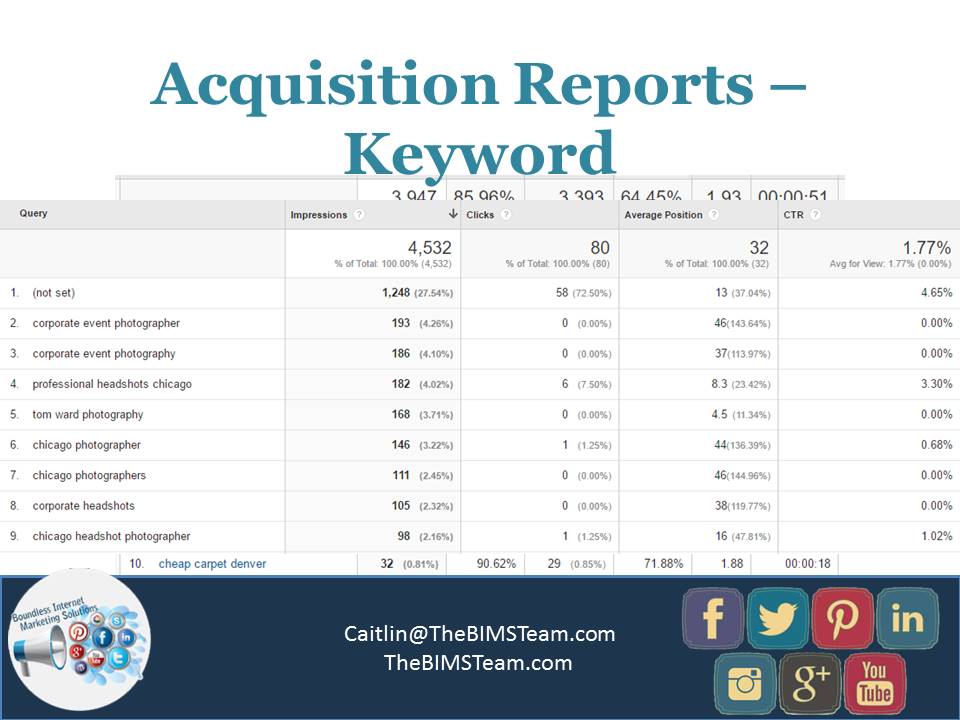
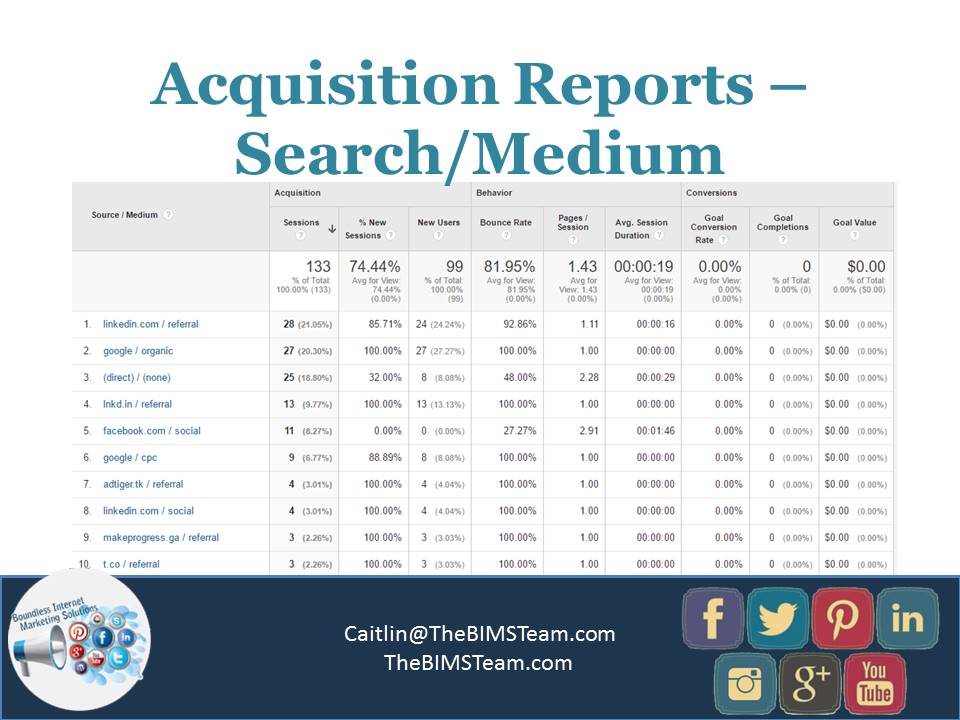
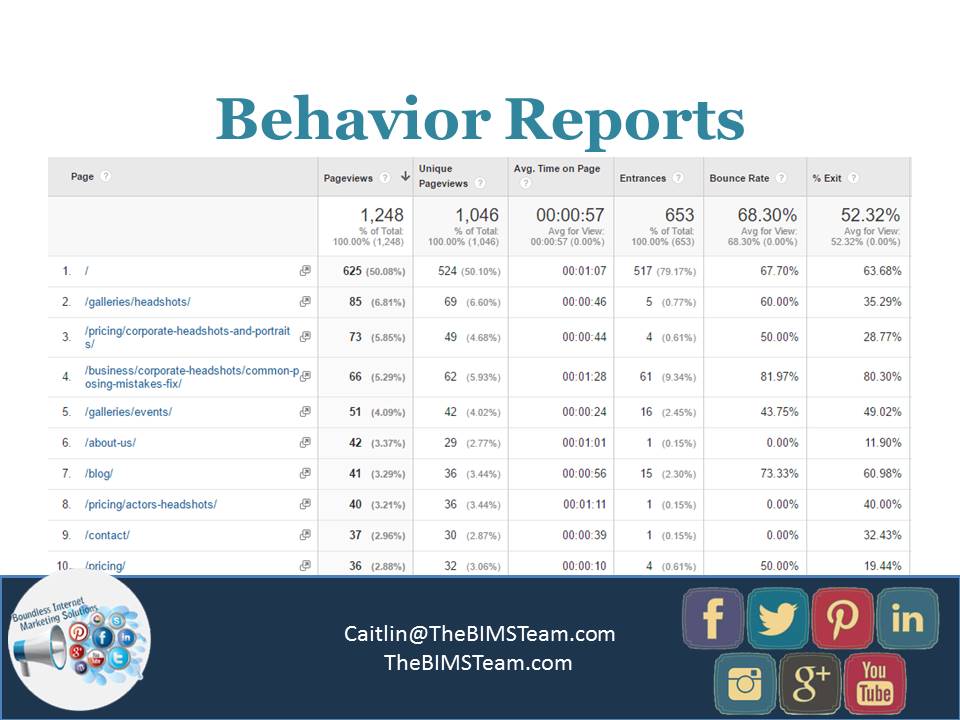
DON’T: Forget to measure your results. You can’t set goals without the following step of measuring your results! Luckily there are incredible, and free, tracking services available for you online. The top ones we use are Google Analytics, Facebook Insights, and Pinterest Insights. The rational here is to see how your efforts have effected your movement towards achieving your marketing (and Facebook) goals.

DON’T: Just post the article title as your post. Say something meaningful about what readers will find if they click the link or take a quote from the article that highlights your main takeaway. Though titles should be descriptive, the same content will appear directly below your post in the link display.

DO: Test the effectiveness of Albums, Slideshows, Carousels, and single Thumbnail images if you are linking to something with many images. Each of these different types of posts will lead to a different response from your followers. We have a photographer, for example, who posts a link with a thumbnail when she first edits a wedding album and creates a blog post as a first peak. Then, she creates a slideshow to reengage the couple and their networks once all of her edits are complete and the couple has access to the images.

Dos-and-donts-of-facebook-marketing-687x1030


Little-known tips to make sure your business sees a return on your investment in Facebook marketing

Facebook is always changing, so it is necessary to take a look at some of the lesser-known strategies on Facebook that maybe you haven’t considered for your business. Some of the strategies below are ones you have seen others implement, while others may be brand new!

Facebook Groups for you Clients and Prospecting

Most users on Facebook are a part of numerous Facebook Groups. These groups are great for your business for a few different reasons. One point to emphasize here is that the groups run through your personal profile rather than your business page. Make sure your personal profile on Facebook links to your business page, is branded with a professional picture, and has the proper security settings.

  1. Joining other groups in your niche provide an avenue to position yourself as an expert and to meet new prospects for your business. I recommend finding 1-3 groups that are active on Facebook and seeing if you can share information that the members will benefit from. Many groups have guidelines about selling to members, but providing valuable information is always appreciated.
  2. Creating a Facebook group or groups for your clients. This can be a great add-on to your services or courses that you run online. Because only paying customers have access to the group(s), you will be more motivated to participate and engage.
  3. Think twice about creating a group for your email list. Recently, many very successful Facebook group managers have been shutting down their ‘public’ Facebook groups. They find themselves spread too thin to really focus on the public group and the specific groups for their clients. I recommend starting small and being engaged with your paying customers rather than trying to create a huge group to prospect from.

Create Custom Audiences when your run Facebook Ads and Segment!

Running ads on Facebook can transform your business or they can be a waste of money. One of the most successful ways to see an ROI from your Facebook ads is by being very niche focused and targeting specific people. By this I mean:

  • Upload your email list and promote posts or specials directly to the list
  • Add a PIXEL to your website and integrate retargeting to your website visitors. You can set the campaigns up to only target people who are been to specific pages on your website. For example, you can show ads only to people who viewed a specific landing page or who downloaded an ebook.
  • Use look-alike audiences to find other individuals who are similar to the people who have responded to your ads.

When you create the audiences and run the Facebook ads, make sure your offer, image, and landing page all are in alignment. Your tribe will pick up if things seem disjoint or like you are targeting too wide of a net.

Add a Video to your Facebook Page Cover Image

This new feature can transform your engagement on your Facebook business page. Guidelines for Facebook Cover Videos are below:

  • Video Dimensions: 820 x 312 pixels
  • Length: 20-90 seconds and can look
  • Sound: Though you can include sound, Facebook automatically mutes the video for user experience

So, what should you do now that you can have a video as your Facebook Cover? Try creating a slideshow video or a quick iphone video that captures your brand. This can be simple to start, but the movement when someone first goes to your business page is sure to keep folks on the page for longer and be more engaging. You can also test out interview style videos or webinar style videos are your cover video.

Wait to Boost a Post

As you can tell, I am all for businesses using Facebook ads to increase the engagement on posts and the traffic to your blog or landing pages. When you plan to boost a  post, hold off on pressing the  Boost button until the post has had a chance to gain organic exposure first. This organic exposure can really help with gaining more traction and keep your costs  down.

Test out Lead Ads

These ads are incredible! If you have a content upgrade on your site or can automatically register people to a webinar, the Lead Ads may work well for your business. Basically, when you create the ad, you also create a form. The form can then be set up to capture someones name, email, and other information. When a user fills out their information, they will be redirected to a page of your choice. For example, you can direct someone to the ebook download page on your site, or to a webinar sign up thank you page. These ads can also be to build your email list.

We’ve found these ads to have a much lower cost per conversion than a lot of other marketing efforts.Get-quote-by-landrover-ad


Schedule your Facebook Posts

Now you shouldn’t always schedule your Facebook posts,  but if you are like most business owners, you are pulled in many directions and hoping on Facebook every day may not be realistic. I  recommend using Facebook’s scheduling functionality for most of your Facebook posts as a way to batch your efforts. Take one day a month and find all the relevant articles, make all of your custom images, and schedule your promotions to be published in advance. Then, as you write blog posts over the course of the month and have other items to share on a daily basis, you can log in and specifically share that content.

We used to always use Buffer for scheduling content for clients, but have found a higher level of engagement when posts are created directly through Facebook.

Add a Call to Action Button to your Page

This is fairly easy to implement! Most of the time we see our clients create their CTA when they first set up their business page. If you haven’t already, however, go to your Facebook business page and click the blue button that states “Add a Button”. Here you can select your CTA and a landing page for any user who clicks the button. Tracking is available through Facebook Insights.

Use fb.com as a URL shortener rather than typing facebook.com

Surprise! fb.com is a URL shortener for all facebook.com addresses.

Use FB.com as a link shortener for your #Facebook Page in your Digital Marketing

User Generated Content

Users today are bombarded with ads. We see them on TV, on our way to work, even on social media. Because of this, people learn to tune out these advertisements. What they value, however, are the opinion and feedback shared by your clients and customers.

People who had great experience with your company are likely to share this with their family and friends. People value these feedbacks. In fact, they can affect the buying decision of prospective customers. If you are looking to attract potential customers and increase your sales, we recommend that you use user-generated content to your advantage.

Here are some tips on how to leverage user-generated content in your marketing strategy.

Run a contest

Running a contest is one of the easiest ways to capture the attention of your target audience. This encourages people to share their story or upload a photo of themselves. In return, you get free endorsements from previous customers.

Through a contest, you can gather some valuable insights from your customers while building a relationship with them. This increases brand visibility and can help you build trust with potential customers.

Advertise with reviews

Instead of flooding your social media accounts with advertisements and company blurbs, why don’t you just share photos or screen shots of customer reviews. This is a great way to show people who happy your customers are with your products. Plus, customers trust customer reviews more than branded content because they come across as honest and reliable.

Encourage engagement

To build a relationship with your target audience, encourage them to share user-generated content. Starbucks had one of the most successful user-generated content campaigns.

A few years back, Starbucks encouraged its customers to decorate their iconic white cup. As expected, people came up with their own unique designs and shared them on social media. They received over 4,000 entries in just 3 weeks.  The coffee chain used the winning design on their reusable cups.

You created your social media accounts, now what-

A lot of people are so excited to get started on social media, they set up their social media accounts and this just sit back and wait for the magic to happen. Well, I hate to tell you that is not really how social media works, all networks won’t work for every business, so it’s important to do your homework first! In this blog we will help you put together that strategy for a good social media marketing outcome!

First, you need to define your goals to accurately understand what “work” means for you.  

We start this off with what we call a Social Media Audit:

  • Set Your Goals – SMART
  • Understand your Customers and Competitors
  • How Utilize Social Media
  • Where is your audience active at

Where is my audience active & where are they searching:

Every minute, people are conducting millions of queries on Google, Twitter, and Facebook. If you are active on these social media platforms, then you have a chance at appearing in social media search results.

Any Niche sites? Just because 1 business gets leads from a site, doesn’t mean you will.

4 Questions to ask Yourself:

1.Where is my audience?

2.Where is my audience active?

3.Where is my audience searching?

4.What niche social media sites are right for me?

Second, we will look at the profiles you have had for awhile or the ones you have just set up. This will help determine where you need to spend your time, remember not every social media platform works the same for each business.

Examine your social media profiles

  • Locate and document all your social media profiles, official and unofficial
  • “Why are we using this social account?”
  • “Why do we want to use it?”
  • “What are our goals for this social media platform?”
  • “Are our target markets using it?”
  • If you no longer have a good reason to use the account or you find that your target market is elsewhere, don’t hesitate to cut ties and focus your effort where it is better spent.
  • Check for completion of all details on these profiles and for consistency in imagery and message

Third, now that you have your social media audit done and you have examined your own social media platforms, now we get to take a look at your competition and see what they are doing. In this case, we don’t look at them as competition, but more of industry leaders.

Examine those who do it well

Find 4 to 8 niche influencers and examine how they manage their brand on social media Observe imagery and branding on each of their profiles. 

Measure key metrics like followers and engagement:

  • Branding: How does their overall look promote the brand? Can visitors get an accurate sense of their personality or culture? How have they chosen to use images in header and avatar?
  • Popularity: How many followers/likes does the page have?
  • Frequency: How often do they post? What do they do on weekends?
  • Engagement: What is the number of people talking about the brand compared to the number of fans?
  • Types of posts: What topics do they frequently discuss? What types of posts do they use: photos, questions, videos, chats, text? What is engagement like for each of these post types?

Make an action plan for improvements and goals for your profiles

Fourth, now we will need to put in place the correct tools to measure your ROI (Return on investment). This can be a little tricky with social media, and is one of the more frequently asked questions that we get!

When measuring your ROI there are a few things to think of that mean social media are working for you:

  • Monitoring the insights that the social media platforms give you
  • Have custom coupon codes for social media platforms
  • Increasing repeat customers
  • Create a custom phone number through Facebook to monitor how many people are calling you through Facebook
  • General branding or exposure – are your brand follower numbers increasing? Facebook likes, Twitter and Instagram followers?
  • Increased organic traffic (SEO) – Monitoring Google Analytics, are you getting more people to your site from social media?

Some tips about the Social Media Platforms:

Facebook

  • One of the largest social media networks
  • Nearly ½ of all users are active each day & connected to 80 pages, groups, or events.
  • Don’t expect sales right away
  • Sponsored ads actually work
  • Share content from other pages

Twitter

  • 85% of Twitter users “feel more connected” to a business after they follow them
  • Not necessarily a lead generation platform
  • Post Often (as in multiple times per day)
  • Use # (Hashtags) and @ (Mentions)
  • Follow the Followers of like-minded companies

Pinterest

  • More popular content-sharing platform than email
  • Highest revenue per click than any other social sharing network
  • Post pins your target market with enjoy
  • Add custom images to your blogs
  • Join as a business & use Rich Pins

LinkedIn

  • User base of professionals
  • Typically most suited for B2B marketing
  • Complete Your Profile and Your Company Profile
  • Build your connections
  • Participate in posting to your profile, company page and groups

Instagram

  • All photos and videos
  • Powerful for promoting both one’s personal brand and a business
  • Post Often and give value
  • Comment and engage on others pages
  • Use Hashtags and Mentions

Google Plus

  • Integrated with Google Search results, the world’s dominant search engine.
  • Complete business brand profile
  • Link to YouTube and add your other social media links
  • Solicit Reviews

YouTube

  • The second largest search engine in the world and reaches more U.S. adults than ANY cable network
  • Create both instructional and fun videos
  • Have clean videos that look professional and authentic
  • Consider Overlay-Ads on videos

Tools (FREE!)

Buffer.com

Hootsuite.com

Feedly.com

Canva.com