Increasing sales is undeniably the primary goal of many businesses, small and large. But the biggest challenge business owners face is how to increase traffic to their e-commerce store. Once you’ve accomplished that, your goal is to turn those visitors into paying customers.
Here are 4 simple things you can do to boost your online sales.
Post fresh content
Just because you have a website, doesn’t mean that you can relax and just wait for potential clients to visit your site. You also need to post fresh content to encourage visitors to return to your site. Having well-written content and product descriptions are important. The more they return, the more likely are they to buy your products and services.
Be honest in your sales copy
Honesty is crucial, not only in building trust in your brand; but also in improving your business’ reputation. Your goal is to show people that you are the best person to provide the products that will help solve their problems. But in order to do that, you need to add credibility to your copy. Be honest in your sales copy and include customer testimonials in your sales letter. It is through this process that people will come to trust you and feel comfortable enough to buy from you. The golden rule – Know, Like, Trust.
Go social
Social media is one of the best ways to increase brand awareness, sales, and customer satisfaction. Actively engage with prospective customers via social media. Talk to them. Answer their questions as quickly and as honestly as you can. Studies show that customers are more likely to purchase products if they receive fast and honest answers from the company.
Don’t forget about your customers once you get them to purchase your products. Send them an email, offer discounts or free shipping on their next purchase. The more attention you pay to them after they have bought something, the more likely are they to turn into repeat customers. Think relationships, not sales.
Offer fewer products
Most businesses create an extensive list of products and services, thinking they’ll get more sales if they have a little something for everyone. But the problem is that prospects will have a hard time deciding whether to buy or not when you have an exhaustive product list. Instead of trying to please everyone, you might want to streamline your products and offer one set of related products. Then, describe those products as best you can.
Also, buyers need to see the benefits of purchasing your products. Try to answer all doubts and questions your visitors may have about your products and really focus on one key set of benefits.
https://socialspeaknetwork.com/wp-content/uploads/2016/02/Tips-to-Boost-Your-Online-Sales.png12602240Caitlin McDonaldhttps://socialspeaknetwork.com/wp-content/uploads/2018/04/SocialSpeak-Logo.pngCaitlin McDonald2021-09-22 08:00:052021-09-21 17:21:05Tips to Boost Your Online Sales
Did you know that healthcare-related queries account for about 7% of all Google searches? According to David Feinberg, head of Google Health, they get approximately 70,000 healthcare queries every minute. This translates to about 1 billion searches a day.
With these statistics, it’s pretty clear that people need a trusted and reliable source of healthcare information. This is your chance to position your practice in front of potential patients.
Use these tips when creating a content marketing strategy for your healthcare practice.
Begin with the audience in mind
Content marketing is about attracting the right audience. To do that, you need to know your audience on a deeper level.
– Who is your ideal audience?
– What’s important to them?
– What are their most common concerns?
– How can you serve their needs?
Once you have a better understanding of your audience, it will be easier for you to craft messages that resonate with them. Plus, you’ll be able to speak their language. Remember, content marketing is about the reader, not your brand.
Set clear, measurable goals
Creating content for your practice can be overwhelming given the sheer volume of options you have. Blog posts, video content, social media posts, podcasts, and ebooks are just some of them.
But when creating content, it is essential to take the time and decide what you want to achieve from it. Simply writing and publishing blog posts is not enough. Getting views isn’t a clear goal either.
When creating content, ask yourself:
– Do you want to educate your audience and turn them into clients?
– Do you want to increase engagement and connect with potential clients?
– Do you want to build trust with your audience and position yourself as a thought leader?
Identify how your content can serve your audience and then create pieces that tie back to that.
Focus on your area of expertise
Some organizations focus on a specific niche. Similarly, every doctor has an area of expertise. Before you start working on your content marketing strategy, it is best to define your area of focus and the main problem areas in your niche.
Start by listing down some of the main concerns and pain points that people in your niche struggle with. You can easily list down some topic ideas based on these problems.
For instance, an ophthalmologist can educate their audience about the dangers of working on a computer for extended periods. On the other hand, dentists can talk about the importance of flossing every day or how to brush teeth with braces properly.
You want to become the person your audience relies on when they need information related to your area of expertise.
Go beyond written content
Content marketing isn’t just limited to written formats. Many businesses are fighting for people’s attention, so you need to figure out how to stand out. The key is to diversify your content strategy.
With the rising popularity of videos, it is good to include videos in your content marketing strategy. You can share short and informative videos on social media. Or do a live Q&A. This will not only help educate your audience but also increase engagement. Other content ideas include infographics, podcasts, webinars, and quizzes.
Humanize your healthcare brand
A patient is more than just a name on a medical chart. They’re someone’s son, daughter, parent, sibling, or spouse. You won’t win their loyalty unless you show them that you care.
People are more likely to engage and connect with you if they know a real person behind your practice. Post regularly on social media. Create some video content. Respond to comments. Make sure, though, that you have a clear policy to let people know that they should contact their physician or 911 in emergency cases.
We can help!
Content marketing has been proven to be highly effective. When done right, it can help you improve your online visibility, boost SEO, and even position yourself as an expert in your industry. Keep in mind, though, that results take time.
To reap all the benefits of content marketing, you need to do post content regularly. It usually takes about six to nine months for your content marketing efforts to bear fruit.
Feel free to reach out to us if you need help with your content marketing strategy. Whether you’re just starting or you’re hoping to double down on your content marketing efforts, we’re to help.
https://socialspeaknetwork.com/wp-content/uploads/2021/09/5-Tips-to-Level-Up-Your-Healthcare-Content-Marketing-Strategy.png12602240Kathlyn Angeles-Timbolhttps://socialspeaknetwork.com/wp-content/uploads/2018/04/SocialSpeak-Logo.pngKathlyn Angeles-Timbol2021-09-15 10:00:562021-09-10 09:59:265 Tips to Level Up Your Healthcare Content Marketing Strategy
I’m sure you have heard the craze around video marketing, right?
It’s 2021 people! At this point in the digital marketing game, you HAVE to implement video marketing! And I am not talking about the cheesy videos, or you hiding behind a presentation and just having your voice being heard. I am talking about getting your face in front of the camera and really connecting with your audience.
One of the biggest trends in the social media marketing world is building an authentic brand, allowing your patients to see behind the scenes, and really know, like, and trust you.
Video marketing allows you to build patient loyalty and keeps you top of mind, by using video your fans can share your videos and are more likely to refer you to family and friends because they have a deeper connection with you and your office.
Why is Video Marketing SO Important?
I totally get the fear of video marketing, we have been in business for over 10 years, and it wasn’t until March of 2018 that we started implementing videos into our own plan.
It was something we ALWAYS recommended our clients did, but not something we DID for our own business! Funny how that works, huh?
You don’t need to have a studio, expensive equipment, or celebrities, you would be amazed at what you can do with the technology you probably already have, like iPhone, or smartphones, a digital HD camera, etc.
This rock can hold people up and get in their heads, it then becomes an excuse, I don’t have a fancy studio, backdrops, big lights, huge camera, etc. therefore I can’t produce a good video.
We will discuss this process below.
Before we jump into the 5 steps for a video marketing strategy, I wanted to give you a few stats from our friends over at HubSpot.
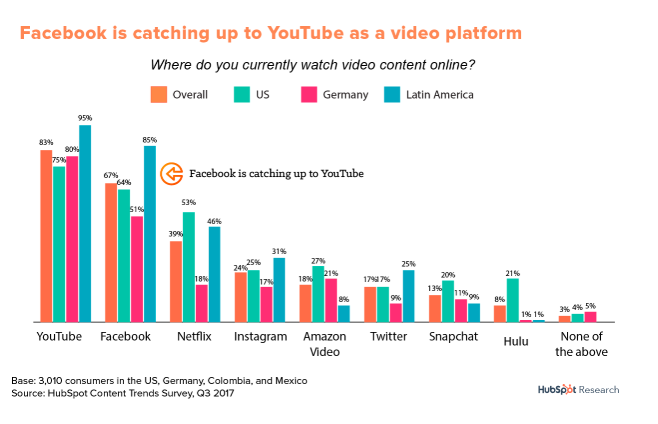
In their words – “Video has absolutely dominated social. According to arecent HubSpot Research report, four of the top six channels on which global consumers watch video are social channels. In addition, a Facebook executive recently predictedthat the platform will be all video in less than five years.”
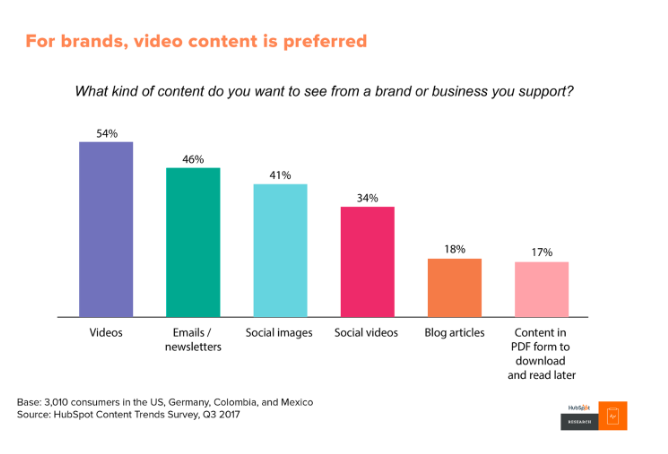
“According to areport from HubSpot Research, more than 50% of consumers want to see videos from brands … more than any other type of content.”
Video is useful for more than entertainment, too. Video on landing pages is capable of increasingconversion rates by 80%, and the mere mention of the word “video” in your email subject line increasesopen rates by 19%. 90% of customersalso say videos help them make buying decisions.
So, let’s dive into the top 5 steps to have a clear video marketing strategy.
Step 1 – Find your Target Audience –
A great place to start with this task is your current patient list, who are you currently serving?
A few questions to ask yourself:
Who is my ideal patient?
What are they visiting my office for?
What problem or pain points do I help them with?
Where are they located?
What is their lifestyle like?
What can you offer them for free to help with a pain point?
Having a clear understanding of WHO your target market is and WHY you want to work with them is key!
Look at your current patient list and think of all your favorite patients, why are they your favorite, what do you like most about them, and what is their living situation like?
You want to attract the right patients into your clinic, right?
Patients who:
Value your services and team
Pay you on time or have good health insurance to cover the bill
Respect your time
Loyalty – Patients that are going to stick with you and brag about you to everyone they know!
Step 2 – Have a plan –
Imagine that! In order to have your video marketing working FOR YOU, you need to write out a clear plan. Now that you understand who your target market is, it’s important to create the videos that are going to connect with them.
There are many different types of videos you can produce:
The best way to organize your video marketing strategy is to implement it into the content calendar we have shared before LINK HERE I would create a new tab for your video marketing, then on the main calendar tab 1, you want to be sure you know when you are sharing those videos and to what platforms.
Step 3 – Figuring out the tactics and techy stuff –
Once you lay out your video marketing topics, then you want to figure out what videos should go on what social media platforms.
As I said in the beginning, you don’t need fancy equipment or a fancy studio in order to produce a good video. These videos are more about building long-lasting relationships with your patients. Building brand loyalty.
We are not talking about a commercial we are talking about 1-3 minute videos. Some of your videos if you are showing a “How To” or interview, those may be longer. Just keep in mind your goal for each video.
What is that videos purpose?
A few things to think of before you hit record are:
Do you need to write out a script or have bullet points? I like to write down the bullet points for each video and what the length should be. When I put a script in front of me I get really nervous, I like to wing it in a way! But. you have to find the best process for you.
Picking the right place – setting the stage. You don’t need to have a fancy studio, but if you pick a spot in your home or office that has good natural light, good sound, that will make a difference. Thinking of doing videos during the day with the natural light, rather than in the evening when it can be darker inside.
Recording Process – How are you going to record the video? Here are a few options
Mac – Quicktime player
Zoom – Screen share option
iPhone or smartphone
Computer Camera (Make sure quality is good)
HD camera
Microphone – you can use your headset or external mic if needed
It may seem like a lot, but see where your team/staff can come in handy and where you may need to outsource a few things.
Be sure to time block for the recording process and the wrap-up (Editing, publishing, thumbnail, etc.)
Step 4: Uploading Your Video
Now, that you have the video recorded and ready to show the world, there are a few steps you will need to take to upload your video correctly.
When you are creating a video it may have a certain purpose, most videos should go onto YouTube regardless, but you may make one specifically for Facebook or Instagram. If that is the case you can upload them directly to those platforms.
YouTube is owned by Google and the 2nd highest trafficked website, they have over a billion users and people are recorded to watch more than 500 million hours of video daily! This number is growing each and every day. So, yeah your videos should always be uploaded to YouTube in addition to social media platforms!
To upload to YouTube:
You will want to make sure you have a YouTube channel set up.
Then you can click upload video
Find the video on your computer
Have a good SEO friendly title
Write a description with call-to-action and link to your website
Once a video is uploaded to YouTube it gives you a link where you can share to Facebook, LinkedIn, Twitter, and Pinterest, it also gives you an HTML code that is how you can put that video onto your website or into a blog.
*** BONUS – Download TubeBuddyTubeBuddy is a browser extension which adds a layer of amazing functionality right on top of YouTube’s website. They help with finding the right tag words and making your video as searchable as possible!
The other thing to think of if you are planning on doing a lot of videos . . . which you will be is where do you want to store your videos? They end up taking up a lot of space on your computer. Look into Vimeo, Dropbox, Zoom, iCloud, etc.
Step 5: Track your results and analyze
One thing I love about doing videos is being able to monitor the results, the views, the comments, the shares, etc. It makes me feel like people are really interested in what I have to say HA!
Just because you do one video doesn’t mean you will get a million views, some of the videos we have done haven’t gotten any views.
It’s important to track these results and find out why, was it a poor title or description, are people not really searching for that?
Remember each video should be addressing your target market and sometimes your messaging needs to be fine-tuned. This is why the planning piece is so crucial because you want to hit the pain points your audience is searching for.
Ways to monitor ROI from video marketing:
Google Analytics
Your YouTube channel stats – check views on each video, comments, likes, etc.
Total views
Clickthrough rate, this would be for email sign-up or on social media
A conversation started through landing pages or on website
Social Media
Likes
Comments
Shares and retweets
I would look at your video marketing each month, at the end of each month analyze each video and collect your data. Make notes of what videos got the most ROI and see how you can create more videos around that topic, then the videos that didn’t do as well, look at the title and description, can it be edited or does the video need to be redone?
What happens if you have high views but little or no engagement? Maybe you do not have a clear call-to-action in the video, ask a question at the end to start the conversations.
Pay attention to the numbers and the platforms you are getting the most engagement.
In conclusion, as you can see it is important to have a plan and logic behind your videos, to make sure each video you make is serving a purpose. I wanted to end this blog with some free tools that can further assist with your video marketing strategy, a few of them I have already mentioned in the blog.
Free Tools to Use for youTube:
BuzzSumo – Analyze what content performs best for any topic or competitor. Find the key influencers to promote your content.
Canva – Allows you to create the correct size Thumbnails for your videos
TubeBuddy – Free browser extension that integrates directly into YouTube to help you run your channel with ease.
https://socialspeaknetwork.com/wp-content/uploads/2019/02/How-to-Create-a-Strong-Video-Marketing-Strategy.png800800Amber Irwinhttps://socialspeaknetwork.com/wp-content/uploads/2018/04/SocialSpeak-Logo.pngAmber Irwin2021-09-01 10:00:022021-08-27 16:14:06How to Create a Strong Video Marketing Strategy
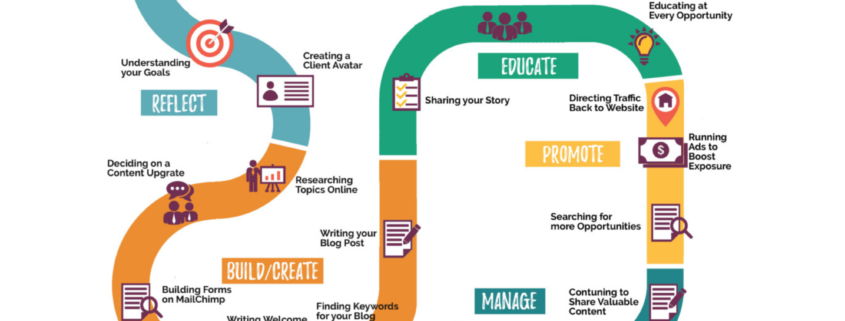
One thing that has been coming up in our business a lot lately is this roadmap to digital marketing. Where do you start, when do you run ads, how do you create an online community? And a lot of times, we just want to jump into one component and hope it works. Digital marketing has grown so much over the past, just five years, just a year, six months. So it’s always changing, it’s always growing, which keeps us on our toes because they’re always adding in new things. When you think of your digital marketing, you always want to be thinking of your client or your patient’s journey.
What are they searching for, how are they going to find your content? How are they going to follow you, how are you going to build the know, like, trust factors? We created this roadmap. There’s a lot of moving pieces, and you can’t just focus on one thing.
Reflect
Let’s start up here by the very beginning, defining your company’s values. What is it that you are doing? What is important to your company? Really understanding those core values, because, in any business, you want to work with good people. You want patients that are going to love you, that are going to come back, that are going to refer their friends and family. So what are those core values that your company and your staff stand for?
If you already have this piece created, great, maybe just double-check it. Go back, look if you guys have grown or changed anything, and then moving into your goal. So what is your goal for digital marketing? Is it just brand awareness, making sure that you’re staying top of mind, that as people are searching for you on Google, that your social media is going to come up, or is it to increase leads, getting new people in the door? Is it to increase your online program, again, by getting people to sign up for your newsletter, what are those goals? And we always use the SMART goals here, so make sure that they are Specific, that they are Measurable, that they are Achievable, Realistic in Time. You don’t want to say, “I’m going to have a million followers in a week”, ’cause that’s not going to happen, but what’s that timeframe you’re going to give yourself? And then we’re going to move into a client avatar. What does this ideal patient or client look like for you? And this is really important. One of the best ways to do this, and this piece here takes a little bit of time, okay? This is kind of that step one.
Build and Create
With that client avatar, think of your favorite patients and clients that you have had. What did you love about them? Why did you love working with them? Did they… What was that relationship that you guys had? Maybe there are 10 of them. Take the common good from them and put them into this client avatar. What does that look like? Okay, so this is our step one of reflection, and then moving into step two, building and creating. So take the time to research topics online. Do a ton of Google researching and figure out… One thing I love about Google is you start typing in two things, it’s going to auto-populate different options. Okay, do those options resonate with your business? If that’s what you think that your clients or your patients would be looking for, start taking notes. Take the time to research what people are searching for. Then thinking of, you have all this content, what is your patient or your client looking for? Can you do some type of freebie? If it is, maybe you’re a pediatrician, and it’s about 10 healthy and fun snacks for kids under eight, and you can put together a freebie, a content upgrade that then you’ll be able to promote to collect those names and emails.
From that research, what can you put together as a freebie to be able to provide to your target market? Then you’ll want to look at how are you going to get that content out there, so you’ll want to look at either building something on your website, Mail Chimp, or even lead pages. This is going to help build your email list. And so writing a welcome series about this content upgrade and how excited you are to have this person a part of your online community, and what they can expect from you, and how often that they’re going to hear from you. Then looking at, based on those research you’ve done online, looking at what blog post can you write around those topics. The blog post takes some time, and if you are a natural writer, then you love, you love blogging because you have all these ideas coming to you, you don’t mind writing 500 words or 750 words or 1000 words, sometimes it’s a little hard to think of what is that blog post, what should it be about? And so when you have kind of this keyword, keyword phrases database that you can go back and look up after, that you could say, “Okay, this is what people are searching for. This is what people have asked me about in my practice this week, those are all great blog topics.” Okay, so we want to make sure we’re paying attention to those keywords that people are searching for in our industry, that’s going to give us the fuel to write those blog posts.
Educate
Now that we have our reflection piece done, we’re building and we’re creating all of our components to go together, now it’s time to start educating your audience. This piece right here is often overlooked because we think, “My story is not that important, people don’t want to hear about me”, and you’re true to a point, but this builds that know, like, trust factor. And that is what is going to bring people in the door. They want to know who you are, why you do what you do, who your team is, who are they going to see when they walk in or who are they going to be speaking with? So really being able to share your story, your personal story, your practice story, your company story, and also asking your team their story. And then with this content and with this content, you’re going to start to grow your network. This is where… Maybe you have a Facebook Likes campaign in to grow the likes on Facebook, you could be adding connections on LinkedIn, you can be sending out messages on Instagram and growing your network that way, followers on Twitter, whichever platform or platforms you’re working with, you want to grow your audience, so they’re able to see all of this great content that you’re going to be putting out.
All of this is education, and here as well, is really being able to put together that social media strategy to educate that audience. You don’t want to be sales, sales, sales, ’cause that’s going turn them off. But if you are promoting some type of a program, maybe this is an online program, then you want to talk about the benefits, you want to think about what are their pain points, what is… What are they going through? What would they be looking for? And that’s how you’re going to create that social media content. So it’s really about connecting with them and educating them and education can be a blog post, this can be videos, this can even be inspirational quotes. I love seeing inspirational quotes on my social media feeds because it motivates me and it’s still, “Oh yeah, I didn’t think of it that way”, or different ones resonate with me at different times of my life, and so that’s still educating. So putting together the social strategy within this educate piece is really important, because then once you have grown your network, you’re posting consistently on social media, you’re educating your audience, so you’re building again that know, like, trust factor, then you can start this promotion piece. And this is where sometimes people want to jump right into here to promote on Facebook ads or Google ads, but they haven’t done any of this yet, so they’re missing a big chunk of the picture.
Promote
Once you get to this piece of it, then it’s really important that you want to be able to promote this free content upgrade that’s going to grow your list, that’s going to grow your network, and put them in front of you. So promotion can be Facebook ads, Instagram ads, Google ads. This on Facebook, you can be doing boosted posts, which is great because that reaches even more people from your social media strategy here. You can also then have a whole ad campaign, which is really important because, with Facebook and your website, you want to be able to track those conversions, and Facebook in the past month has made a lot of changes to the backend of the ad. So it’s really important to understand what you’re doing, or have a company like us that understands that you’re able to get ads approved, that you’re able to track the conversions, that you have the Facebook pixel in the right place, all of these things come in to play so you are able to reach the right people and really grow that network and turn the people that just downloaded this freebie into a paying client. That’s key. So, once you have this piece done, you get to this promotion, then you want to look for what are more opportunities.
Management
After they get the freebie, maybe you can do a retargeting ad to those people and have another content upgrade that would maybe be like step two or the next step up from what you’ve created, okay? Or it could be something that is completely different, but still within that target market, just another thing they may want and be looking for. And so then all this comes down to managing, and this is a big piece of it. This is the most time-consuming piece, and our clients, love to write content, they love to put the videos together, they love what the idea is, but it’s a lot to manage because each of these pieces has its own little moving parts within that core. And so this is really where you have that social media strategy, so you’re creating the content, you’re posting anywhere between three and seven times per week. You are running your ads to promote your freebie, and ads you may have maybe five to 11 different ads running with different variations that are going to go back to this freebie, okay. So you’ll have a different language, you may be trying out a video on one ad, a still image on one ad, maybe a video that you’ve put together in Canva. So this management piece is really where you are then able to look at the big picture and say, “Okay, this is what’s working, this is how many conversions that we’ve gotten this week, here’s our social media analytics. This is what ads are working, this is what we need to change.”
This management piece is a daily, a weekly, a monthly, a yearly thing, and so this hopefully gives you that big picture of what your digital marketing strategy should look like. And each business is different, so you may have different tools in here that other companies don’t and based on your business model. But this is really just the overflow of what it is you should be doing in order to really see those leads come through and see your digital marketing go from here to here because at the end of the day, you really want that ROI. And if you’re not doing all of these pieces the right way, you’re not going to see that and you’re going to be wasting your money. So it’s important to look at each component and see how can you improve or change things of what you are doing to be able to have your digital marketing work for you.
If you are looking for help putting a strategy in place or having help managing the strategy you have put in place, we would love to schedule a free 30-minute consultation with you to go over what you are doing, where you want to be, again, reflecting on those goals and putting a plan in place to see that ROI.
https://socialspeaknetwork.com/wp-content/uploads/2021/08/Roadmap-to-digital-marketing.png12602240Amber Irwinhttps://socialspeaknetwork.com/wp-content/uploads/2018/04/SocialSpeak-Logo.pngAmber Irwin2021-08-25 06:00:202021-08-23 14:32:17How to create a roadmap for your digital marketing strategy.
Do you read product reviews before you purchase something new? Do you trust customer ratings better than the sales pitch of a seller?
From deciding which smartphone to buy to where to eat and finding a new doctor, at least 93% of people read through reviews before making a decision. The majority of them are interested in knowing what previous customers and clients have to say before making a purchase or booking an appointment.
How Impactful are Customer Reviews?
Customer reviews had become the layperson’s gauge for the trustworthiness of a product, service, or company. According to a Spiegel Medill research, products with reviews are 270% more likely to be bought than unreviewed ones. For more costly items, this probability increases to up to 380%. This simply shows how important and impactful customer reviews are.
Positive reviews can feel like a warm hug that validates the work that you do, but it does way more than that. It can establish your business’ credibility and trustworthiness to the general public. This can directly increase your market and translate to sales. It’s a waste of a free resource if you don’t use customer review in your sales plan.
How can you maximize the power of a review in your everyday marketing? Through what strategy can you use it in boosting your sales?
Let us give you some ideas.
Include them on all the pages of your website
Customer reviews should be on your website’s landing page. This is where you can create conversions and build a customer base. Since the landing page is dedicated for readers to make a transaction, seeing reviews and testimonials on this page can influence their actions.
Beyond the landing page, it will also benefit you to include at least one review or testimonial on each of the pages of your website. This way, no matter what page your readers are on, they are subtly assured of your good reputation with consumers just like them.
Share them on social media
It’s no secret how most of us rely on social media for information. Globally, at least 4 billion of us are on this platform. That’s a massive reach! This then becomes the perfect venue to share your customer reviews.
Reviews on social media are from random people. Your readers perceive them as unbiased. Most people take it as a personal recommendation rather than as a sales pitch. They are more likely to be persuaded by it.
Posting exceptional reviews and those from influencers and celebrities can boost not only your confidence but that of your potential consumers, too. Make use of your social media reach to highlight what others have to say about you.
Include it in your emails
Digital marketers can attest that until now, email marketing is still the most profitable tool out there. It can generate $44 for every $1 spent, so it only makes sense to use it in your marketing strategy.
Including customer reviews in your emails will increase your credibility off-site. Reviews in emails can give recipients an idea of the benefits they can get should they transact business with you. They would want to know more about you, and would thereby generate higher conversion rates.
Incorporate them in your marketing collateral
On a non-digital platform, collaterals continue to be an effective marketing tool. Include snippets and shots of customer reviews on your posters, brochures, and flyers. You may even consider including it in your business card.
This can speak right to potential customers who are already within your vicinity. It increases the chance of an immediate direct response. If not immediately, since you’re targeting customers directly, they can quickly come back and finalize doing business with you.
Highlight it in your advertisements
Research shows that user-generated promotional materials get four times more click-through rates. The reviews you receive are already free user-generated content that the public intuitively trusts. Make the most of it by making it prominent in your video advertisements. Not only is this less costly, but it is also perceived as reliable by many.
Ensure that your business provides spaces for customer reviews, such as in your social media accounts and other reputable crowd-sourced review sites. Once you receive their feedback, you can now use them for purposes that best serve your market.
If you need help with digital marketing, we’re here to help. Book a free 30-minute consultation call with us and we’ll work together in create a marketing strategy that will get people through the door.
https://socialspeaknetwork.com/wp-content/uploads/2021/08/Blog-Graphic.png1200800Kathlyn Angeles-Timbolhttps://socialspeaknetwork.com/wp-content/uploads/2018/04/SocialSpeak-Logo.pngKathlyn Angeles-Timbol2021-08-18 10:30:022021-08-13 09:47:585 Ways to Use Customer Reviews in Your Marketing
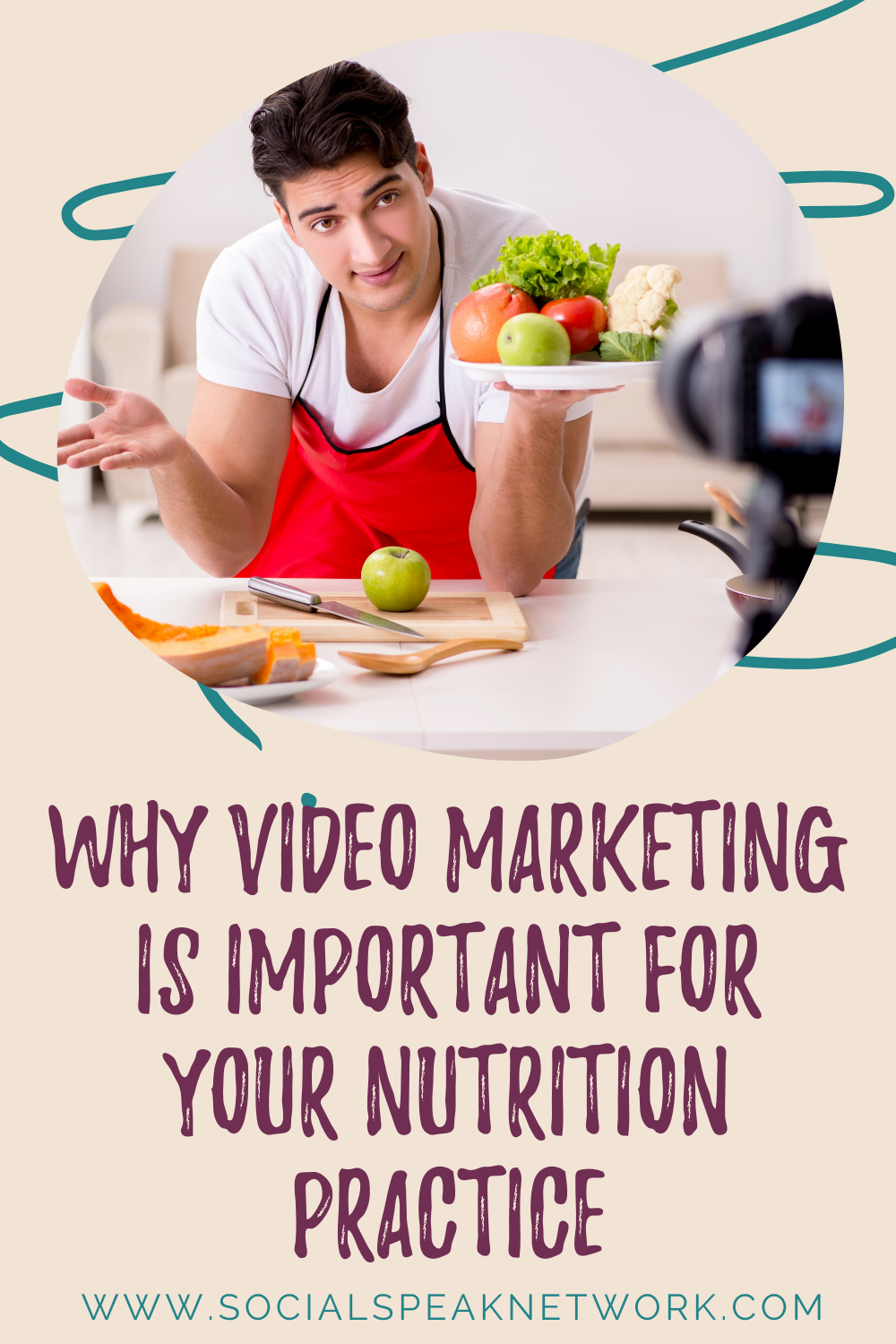
Video marketing is such an important piece of your digital marketing strategy. In today’s marketing world people want to be able to connect with their healthcare providers and know who they are.
Videos are such an easy way to be able to connect with your audience on a deeper level. Gone are the days of making extravagant videos, going WAY over budget, having a studio, etc. Let’s get back to the basics, being authentic in the videos, recording on smartphones or newer computers with good quality.
Should I be doing video?
Should I be doing video? Clients ask us this question all the time. And the answer is yes, it’s very simple, yes.
Video marketing is such an important piece of your online digital marketing strategy. Because digital marketing has grown so much, people really wanna be able to see who you are, to feel like they know you, and get a sense of how the office runs, especially in the healthcare industry. You have to think of that patient journey, what they are struggling with, what they’re going through, why they may be reaching out to you for your services, whether it’s chiropractic, acupuncture, ob/GYN, medical issues, lifethreatening diseases, cancer, all these different things, you have to think of what they’re going through.
And even though there’s a ton of content online to read, and they can call the office, if they can see videos, and they can see the doctors, and they can see the front desk and the staff at the front desk, and they can see the nurses.
Videos help build trust
Videos help build that gap when they are reaching out for a healthcare provider. And they feel like they know, like, and trust you, which are the three main factors in marketing. Remember, people need to know, like, and trust you in order to do business with you.
Studies suggest that 80% of online visitors will watch a video, while only 20% will completely read a piece of written content. So if getting your audience engaged and fully immersed in your healthcarerelated information is important to you, then so should video. As stats show, your audience is more likely to consume your content to its full capacity when there’s a video involved. This is also something, you have to think of the healthcare industry when you are explaining, maybe it’s symptoms, or a process, a procedure.
When they can hear it straight from the doctor’s mouth, that builds that trust. They’re able to really know what the doctor and the staff, that they know what they’re talking about.
Tools for creating videos
And there are so many different tools out there that make video marketing so easy. There’s a reason or a process to everything and having a professional videographer come in for a commercial shoot, maybe a video on the website, that’s really important. I am not discrediting that at all; that is something that’s really important to have. And it’s really easy to do your videos inhouse for your daily tips, your blogs, even your YouTube videos. So it’s not a huge cost item anymore either.
So I wanted to share with you some tools that we use for screen sharing. So this is really good if a doctor puts together maybe a PowerPoint, or has images they wanna share, diagrams. If you wanna walk through a process, you can have it just on your computer, and you can share your screen, and you can go through that presentation
Zoom
So the tool that we use a lot is called Zoom, ZOOM. And this allows you to do video recording such as this, and it gives us the video file and the audio file, which serves two purposes. Obviously, the video is great for the website, for YouTube, and your social media marketing.
The audio file is great for podcasts, and that’s exactly what we do. There’s no point in recreating that wheel when you can use one piece of information for multiple purposes.
Loom
The other one is Loom, and that works the same way as Zoom does.
I know, Zoom and Loom, it can get a little bit more confusing. But those are two great tools that you can if you wan to share your screen while recording a video.
Animoto and Ripl
And the other two that we like to use are Animoto and Riple. These are more for those cute, fun videos to throw into social media if you have a new staff member coming on. This is where you take pictures of them, maybe it’s them in the office, a couple of pictures of their personal life. And you can make a cute video, I use Animoto and Ripl.
There are free versions and paid versions. I would do the paid version, just so you don’t have their logo on it, and you can actually add your logo, and add text to it. They’re not expensive at all. So those are two videos that have fun little templates, holiday theme if you wanna have a little office video that says Happy Holidays. You can do little snippets of videos and images together and then they put it together into a video format.
So those are what we call more of the fluff posts for social media, but they’re videos that people like to see. You can do fun facts, so you can do facts around a certain topic in an Animoto video and share it, you can ask questions.
Tips for recording videos
So videos don’t need to be complicated. If you have a Mac, you can just use QuickTime Player and record yourself. Again, if you’re gonna do that, I would highly recommend using Zoom because you do get that audio file and the video file. And if you use your phone, you can use your iPhone or Android as well.
If I’m recording a video for social media and I also want it to go onto YouTube, I will have my Zoom screen up, and then I also would have my phone vertical recording as well, so I can use that for Instagram Stories and Facebook. I know it sounds complicated, and a lot of times it’s just getting used to being in front of the camera.
Having those bullet points of what you wanna talk about. I have my bullet points right here with some stats written down that I will go into. I have another screen pulled up so I know what those bullet points are that I wanna cover. And so it’s really figuring out that system for you. Some people write full-on strips and tape them up. So you have to find that system that works for you, you don’t have a choice anymore in digital marketing, you have to be doing videos. And the more videos you do, the better.
Getting started with video marketing
So if you’re thinking, “where I would start with this video marketing strategy?.” Start by asking yourself the following questions:
What are your clients or your patients asking you?
What questions are they coming to you with, and how can you address those?
What are those hot topics in your industry? Is it around vaping, opioids, vitamins? Is it working out, is it diet?
Are they asking you what they can do to improve the quality of their life? And so start paying attention to what are they asking you, and then start doing videos around that.
Start with small things, maybe it’s just one question. Keep it short, simple, and to the point. So less than three minutes is great.
If you’re doing a presentation, you’re explaining diagrams, or you’re teaching them something, then I will go up to 10 minutes. Keep in mind that if you’re posting it onto Instagram, it can’t be more than 10 minutes for Instagram TV. And you also have to think of, what are you talking about that you wanna be able to keep their attention. So their attention span is gonna be shorter, too, so you wanna make sure that that video is giving them a lot of details, a lot of valuable information that they wanna keep watching it.
Importance of video marketing
83% of marketers believe that video is growing in importance. Duh. It is so important. We have to be doing it. 53% of customers engage with a brand or a business after watching a video
Your audience is cyberstalking you, which sounds horrible, but they are doing their research. They are looking at multiple different healthcare practices, from who they are, where they’re at, what their expertise is, what are they talking about on social media, are being consistent with social media, do they have the videos? Is their website userfriendly? And we talked about that user experience, that digital experience for your patients, for your audience, is that an easy process?
So even if you do an intro video on your website, like welcome to our website, here’s where you need to go to book your appointment, here’s where our expertise is, it’s really important to make sure that you have these videos and you make that experience as simple as possible for your audience. So you just gotta get in there, you gotta get in front of the camera. You’re gonna have 10 takes before it’s perfect, and that’s okay, and keep going.
Editing your videos
So then my next question I get is, “Well, what about editing? Do you edit your videos? And if so, what software do you use to edit your videos”?
I’m usually the type of person that I wanna get it done in one take. I don’t wanna have to stop and splice it together. I like to have my points, get it done in one take, and that may take me three or four times, but I’m not editing a lot. So in your first couple of videos, you may have it at the beginning where there’s a pause and then you say, “Hi!” Or in the end, you pause and then you talk again.
So some simple editing, beginning and ending. If you have a Mac, you can use iMovie, if you have a PC you can use the Movie Maker, which does a good job. You can use Adobe Premiere Clip. And also YouTube does have some video editing tools in there, and they work great, so you can edit a beginning. So again, if there’s that pause at the beginning or a pause at the end, you can use that.
Sometimes you wanna add an intro. You can do that in Movie Maker or iMovie. There’s a ton of different video editing software out there. And again, we like to keep it as simple as possible, so find the one that works best for you. As I said, YouTube, iMovie, or Movie Maker for those beginning, pieces is a great idea just to get used to it and then if you wanna add more effects or different things to it, you can start doing some more research and looking at Adobe Premiere Clip and other video editing software.
Maximizing your video content
So start by, again, listening to your patients, what are they asking, what are those hot topics that people are talking about in your industry? Do some research on your competitors: Are they doing videos? What are they talking about? Looking at other videos, just YouTubing videos on those topics, those keywords that you’re thinking about, seeing how many views they have.
Once you take your video and you upload it to YouTube, think that SEO, think those keywords, what would they be typing in to find this video? In your description, make sure that you have a link back to your website, so if you’re talking about a treatment or a condition that… Or even a blog post, tie it back to a link on your website, so there’s that call to action.
So it’s really important, you’ve gotta think about this as another process in your marketing. So you find your bullet points for your video, you record your video, you upload it to YouTube, and you share it with social media. Once the video’s on YouTube, you can take that video and insert it into your blog posts as well.
Videos are a great addition to add to your blog posts. And so we usually will write a blog post and then do a video, so we’re touching both parts. People can watch a video and then they can read the blog. And so the blog is great for SEO, the video is great for our audience. So finding that balance, and start doing some videos, and just get it in the habit, whether you’re doing one per week to start, and then start moving it up to maybe two per week.
What is the point of that video? Again, is it an FAQ, is it a treatment condition, is it a blog post? And then what’s a call to action for each video? And our call to action for our podcasts is to be sure to go to Podbean or iTunes and subscribe to our podcast so you can listen to all these amazing tips that we’re sharing with you. And also if you are struggling with that video strategy, head on over to socialspeaknetwork.com and request a free 30minute consultation, and we can walk through this video strategy with you.
So I look forward to seeing your videos. Please drop a link below to your YouTube channel, we would love to take a look at them, and get a recording. Have a great day.
https://socialspeaknetwork.com/wp-content/uploads/2019/10/Copy-of-Why-Video-Marketing-is-Such-an-Important-Piece-of-Your-Online-Strategy-1.png800800Amber Irwinhttps://socialspeaknetwork.com/wp-content/uploads/2018/04/SocialSpeak-Logo.pngAmber Irwin2021-08-04 10:00:232021-07-30 16:11:21Why Video Marketing is Such an Important Piece of Your Online Strategy
When you manage several social media channels and create lots of content, it can be challenging to keep up.
A social media content calendar helps you plan your content and visualize your strategy over time. It allows plenty of time to fill the spaces with relevant content, preventing you from publishing poorly written posts. It will prevent you from going into a full panic mode since everything was planned and pre-scheduled.
Need help in creating social media content calendar? Follow the tips below.
Audit your social network
What’s great about digital marketing is that almost everything is measurable.
Take time to go through your social media accounts and posts to see how your content is received.
When auditing your social media profiles and your previous posts, you will begin to notice a trend. Identify what types of content are getting more engagements on each platform. Also, identify which posts sparked the most conversation. This will clue you in to where you should focus your efforts over the next month or two.
Define your goals
Before you start creating content, it is a good idea to ask yourself: what is the primary goal?
Do you wish to drive more traffic to your website? Are you hoping to get more leads? Or do you want to grow your following? By defining your goals early on, you’ll have a clear idea of the expected results.
Pushing out content without a clear purpose won’t benefit your business or your practice. Instead, it will only lead to wasted time, effort, and resources.
Plan your content
Once you’re clear on your goals for social media marketing, it’s time to plan your content.
When you hit a high-performing piece of content, it can be tempting to keep posting similar content week after week. While this might work initially, it will have diminishing returns over time. Come to think of it. Even the best dinner gets old if you serve it every night.
When creating content, make sure you’re not posting the same sort of content. If you do, your followers may find your posts boring and can lead to disengagement or unfollowing.
Decide on the publishing frequency
Now, it’s time to decide on the publishing frequency. You see, social media success isn’t something you can achieve overnight. It will require hard work and patience. Posting consistently on social media makes you more visible to your audience. But that doesn’t mean you should spam them with too many posts each day. Posting seldomly may cause your audience to forget you.
This is why it’s essential to choose a publishing frequency that works for you. Think about how often you can publish fresh content realistically. If you can only commit to posting three times a week, then that’s fine as long as you stick to your posting schedule.
Keep evergreen content at hand
Evergreen content is something that can provide value to your audience over long periods.
If you’ve been interviewed, you are free to share it again at a later date, so those who missed it will have the opportunity to watch it. You can also share blog posts that list out various tips and tricks. We bet most of these tips are timeless and can be shared with your audience again and again. Of course, you can also post evergreen content from other websites.
Don’t miss out on relevant moments
There are so many holidays and pseudo-holidays each year. Some marketers tend to consider social media holiday posts as “fluff’. But your audience doesn’t see it that way. As long as you keep your audience in mind, they’ll create emotional touchpoints in your marketing campaign and get the engagement you seek.
Holidays and special events are a great way to connect with your audience. You may find companies that use unusual holidays to sell their products and services. Don’t be left out – become one of them.
The year is full of special events. Do your due diligence and take note of local, national, and international holidays. Identify those holidays and somehow connect to the products or services you provide. A content calendar will reduce the risk of forgetting or missing out on these events.
Choose your publishing tool
Forget setting the alarm to remind yourself to post. Instead, choose a publishing tool that will help you make the most of your time.
Automation helps you save time, achieve consistency in your social media marketing efforts, and gives you greater control over the content.
Buffer, Hootsuite, and SproutSocial are just some of the best tools that can help you streamline and automate your social media content so that you can focus on more critical aspects of your business.
Final thoughts
A well-thought-out and organized social media calendar serves as a framework for what you plan to share and promote across all social platforms.
If you need help planning and creating a social media content calendar, please let us know. Book a 30-minute consultation call with us, and we’ll help you take your social media marketing game to the next level.
https://socialspeaknetwork.com/wp-content/uploads/2021/07/blog-banner.png12602240Kathlyn Angeles-Timbolhttps://socialspeaknetwork.com/wp-content/uploads/2018/04/SocialSpeak-Logo.pngKathlyn Angeles-Timbol2021-07-21 10:55:192021-07-20 18:12:107 Tips for Creating a Social Media Content Calendar
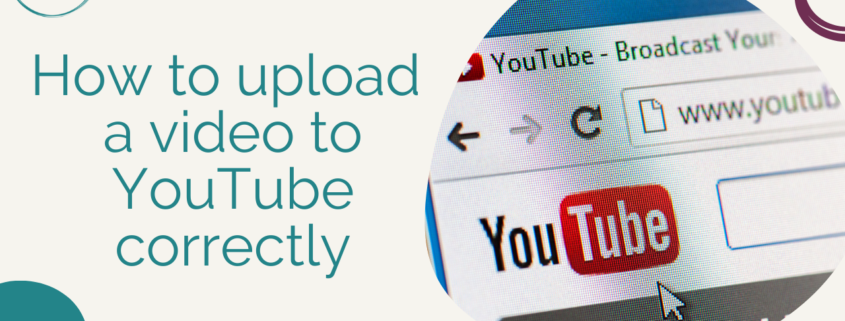
Today, we are going to walk through how to upload a video correctly to YouTube. And it’s kind of one of those things, fill out all the blanks, but there are some things that people don’t understand that play a big piece in the SEO of your YouTube channel. When you login to your YouTube channel, you will have this create video here. Now, a tool that we use is called Tube Buddy, and this is a great add-on to really help add SEO, Search Engine Optimization to your YouTube videos. We’ll get to that within this tutorial, but it’s called Tube Buddy, and right here, you’re going click to upload your video. And after you upload your video, and it just takes a quick second since I’m doing a screen share. You’re going to have an option to select the files from your computer. I’m going go ahead and just do this Zoom recording I had done earlier with a client, it’s going upload the video. Based on the length of your video, it will determine how long it takes to upload it. Okay, once you have the video, it’s processing the video, YouTube does a great job on walking you through what you should be doing, okay, again, filling out those blanks.
Adding a Title and Description to Your YouTube Video
You are required to have a title, and again, the title you want to make sure is using those keywords of what the video is on and what people would be searching for. Here I’m going say, how to create custom images in Canva? Now, in your description, I like having a how to or step, something where people… What the title you should be thinking is what would people be typing into YouTube or Google to find that video? How to is a great way, healthy eating ideas, healthy snacks for kids, whatever that topic is your video is around, this is where that title comes in. Now with your description, you have 5000 characters you can use for your video description. And with that, you need to have at least 500 for each video. What I’d like to do is when you are recording a video. What we do is we record our video and then we transcribe our video on Scribie. And then I would take that first paragraph of that transcription from our blog and put it in here. Maybe it would say, in this video, you will learn how to create custom images in Canva, building a brand with your digital marketing, yada, yada yada, we want to keep on going.
Then you would say to learn more, visit our blog at, and then you could put the URL to your blog there. Okay, this is a great area in here, you want to make sure that you have your keyword and that you are describing what that video is about. It’s clear to the viewer that they understand what it is they are going to be learning. Now, the next thing is the thumbnail, you can create a custom thumbnail in Canva, and what we’ll do is they have… This moved me… If you have used Canva, you’ll know that they have a ton of designs on here, there’s a free version and a paid version. We have the paid version, and it’s running a little bit slow today, but you can actually create a custom YouTube thumbnail. We’ll let that load. But what you would do here is then click upload thumbnail and you would upload that thumbnail from your computer to here. YouTube tends to have, especially if it’s a video of you talking, they pick the worst thumbnails where your eyes are closed. It’s a horrible thumbnail, I always recommend creating a custom thumbnail in Canva, you can have that correct size and then you can upload that to here.
Additonal Features When Uploading Your YouTube Video
Once you have your custom thumbnail uploaded, then what you’re going to do is choose playlist. We have a ton of playlists, this helps keep our channel organized, and what you could do is, if this is, let’s say you are a pediatrician, this can be tips for parents, this can be eating healthy for kids, whatever those categories are, are what your playlists are going to be. I’m going click this to be… We’ll do social media tips, and it could be more than one category, you can choose two or three and then click done. Now, what you want to come down and do is, this is where if it’s made for kids or not. And what this does, if it says yes it’s made for kids, then kids that have access to YouTube Kids, and for whatever reasons they were to type in something similar to what your video is talking about, your video could show up in YouTube Kids. Even though this video there’s nothing wrong with it, it’s a great tutorial. I’m going say it’s not made for kids because they don’t need to know this. You could do an age restriction if you need to, but I just say no, not made for kids, and it’s fine. Here’s a piece you want to make sure you do not skip over, this show more. And this is where Tube Buddy comes in action, right here, your tag, these are keywords that people would type into YouTube to find a video.
This says tag to be useful if content in your video is commonly misspelled. Otherwise, tags play a minimal role in helping viewers find your video. You want to have things like how to, very broad and then very niche, I can type in Canva. And then this is where YouTube comes into play, I can do Canva tutorial for beginners. Now, if I scroll down a tad bit, you’ll see these tag tools, these recommended tags. This is Tube Buddy, helping me figure out what I should put into that tag area, you can do it by relevance or keyword score. I like keywords score ’cause I feel like that’s what people are searching more for, this is Canva templates, then we would come down to… And I would just pick the ones that I feel best fit my video that I was talking about. Okay. You can add up to 500 characters in here. I always like to have at least between five and 20, if you can tags in here. TubeBuddy is a great way to help. Obviously, these ones that are in orange and yellow are the best to choose from, and then as they go to red, they become a little bit less searched for. I’m going do one more. And then what I’m going do is I’m going click next.
This is where if you want to have subtitles, you can add subtitles to your video, you can also add an end screen. You can create a template and then add it to there, or you can create your own. And this is just helping people stay on your channel, and be able to find other videos that you have put on. Promote related content at the end of your video. And if you do this, it will tell you, and again, based on the popularity of your channel, how long you have had your channel, if you’re verified, all these things will allow you what you can and cannot have on here. This will say, subscribe to Social Speak, you can choose where you want this to show up. I like to have it towards the end it’s not blocking the content. At the end of your video, if you are just chit-chatting a little bit, that’s where then I would have this come up so people can subscribe to that video or to your channel. And then you could also add a card, and this is, if you’re talking about maybe a free PDF and in your video, you say, “Be sure to download my free PDF on my website about such and such.” This is where you can promote another video once you reach a certain… When you join the partner program with YouTube, that’s when you’re going have a link. But you can promote your channel, a certain playlist, another video.
This is where you would say, be sure to watch this other video that explains our freebie or how to download our freebie, whatever that is, that call to action. These cards are great for call to action, I may want to do a playlist and I’m going click into, let’s just do healthcare digital marketing tips. Then I can choose at what point in the video, I want this to show up right here. If you are watching a YouTube video and you see this little eye icon, that is an info card. And if you click onto it, it will take you to somewhere else, whether it is a playlist, a video, or if they are a partner of YouTube, take them to a link. Then you can click next and they’ll make sure if you have any music in the background, if you are talking about anything, YouTube just check to make sure that you’re following all of the copyright rules that YouTube set. No issues found, which is great, I can click next. Here, what we have, I get a check mark here. Video elements, I’m going go back to there to see, that’s where these are. I don’t have a check mark here because I didn’t add those to this video. You click next, next, this is where you can schedule a video to post, you can make it public, which means it’s going to be found in YouTube, you can use this link to promote it out, and it’s searchable within YouTube.
Unlisted means that anyone with the video link can watch that video. I like to use unlisted for our newsletters, we may just do a video just for our newsletter subscribers. And I don’t want to be found on YouTube. I’m just housing that video on YouTube, and using unlisted is a great idea because then I can still email that link out to people and they can watch it, but it’s not searchable within YouTube. The other one is private. Private is great, if you’re doing an online course or a private, like maybe telehealth or a coaching session where you recorded that session just for that person, and then you can share it just with them, it’s only viewable to the people that you invite. Okay? For this one, I’m just going do unlisted because this is a video that I am going to publish to the public, and then you will click save, and then what you’ll do is you can from here, share it to any of these. But if you go to the video and you right click on it, and you could copy the embedded code to put that into your blog post. If you’re using Mailchimp or Constant Contact and you want to put this video into your email, then you just need the link and then within there, they would show you how to add that video.
Final Steps to Upload Your YouTube Video
Those are just a few steps you want to take to make sure that your video is being uploaded correctly to YouTube, and you have all of the boxes checked, everything to just make sure that you are optimizing your YouTube videos the best you can. If you need help with creating that YouTube strategy and how to upload your videos to your channel, please let us know. You can schedule a free 30-minute consultation and we would love to walk through that with you. Thank you guys, have a great day.
https://socialspeaknetwork.com/wp-content/uploads/2021/07/How-to-upload-a-video-to-YouTube-correctly.png7201280Amber Irwinhttps://socialspeaknetwork.com/wp-content/uploads/2018/04/SocialSpeak-Logo.pngAmber Irwin2021-07-14 07:00:422021-07-13 16:59:01How to upload a video to YouTube correctly
In today’s episode we are going to be talking about blogging for your healthcare center or your wellness practice. Blogging is one of the best ways for you to share your knowledge and your education with prospects and with your network online.
Additionally, a well-written blog post helps to boost your search engine (SEO) rankings for your website thus driving more traffic, to your website for specific keywords and keyword phrases.
It’s always important as you’re writing a blog post to keep both that end-user, or that potential patient in mind as well as keeping the search engines in mind too.
How do you go about finding topics to blog about, how do you go about writing that blog post and structuring it, and how do you share it after it’s written?
These are the key elements that we will be covering today in the video about How to Blog to Boost SEO for Healthcare Providers.
00:00 Caitlin McDonald: Hello and welcome to the Social Speak Network podcast. I’m Caitlin McDonald and I am the co-founder of Social Speak. And today’s episode we are going to be talking about blogging for your healthcare center or your wellness practice. Now blogging is one of the best ways for you to share your knowledge and your education with prospects and with your network online. Additionally, a well-written blog post helps to boost your search engine rankings for your website thus driving more traffic, to your website for specific keywords and keyword phrases. So it’s always important as you’re writing a blog post to keep both that end-user, or that potential patient in mind as well as keeping the search engines in mind too. So how do you go about finding topics to blog about how do you go about writing that blog post and structuring it and how do you share it after it’s written. So that’s what we’re going to be covering today.
01:19 CM: So the first part of that question is thinking about what topics you should blog about. Now, it’s always important to blog about something that you are knowledgeable about. So you want to make sure that you’re blogging about topics within your practice or industry that you actually know about and care about. If you are not the specialist in that topic, find somebody in your practice who’s better suited to write about it or who can at least edit the information that you’ve put out. We find this often especially with some smaller health care centers where they have one person who’s in charge of doing the blogging. Unfortunately, they don’t necessarily have the expertise in whatever specific topic there is. For our team, for example, when we are going into a new practice, we make sure that we are matching that practice up with a writer who’s going to be suited to talk about those topics. If we’re talking about Pediatrics, or if we’re talking about pain management, we might have two different writers for those two topics. They’re very different, and they require a different level of understanding of who that patient is, what that patient journey is, and everything like that. So let’s get back to writing that blog post, so to find a topic to write about one make sure that it’s something that you are very knowledgeable about two, make sure that some people are searching for it.
03:03 CM: So what I typically recommend doing is taking out a pen and paper, and actually writing a list of different topics that you talk about with patients and with prospects. So by this I mean, what are the questions that people are asking you what are their top concerns what are they looking for, what benefit does the practice provide to them what are the specialties of your practice, what additional things can your services and specialties help to solve for your patients? Now take a look at this list and what I recommend doing is hopping on over to Google and starting to type in these, phrases, what you’ll see is that Google will pre-populate other searches that are related to it, or searches that other people search for. Now, there are also tools that you can use to do this research. So, I like first starting out doing your own brainstorm looking at Google search results, and just set your timer takes about 30 minutes to do this exercise, make as many notes as you can.
04:22 CM: I often find myself hand-writing them, probably it would be a little bit more streamlined if you do this for yourself, in a spreadsheet so that you don’t replicate work overtime. The next thing to do is either head on over to Keyword finder kwfinder.com or over to Neil Patel’s Uberselect app. Now, this is a new app that he has brought to the market and it currently is completely free. So what you do is, within this app and I’ll have a link down below, excuse me Ubersuggest not Uberselect Ubersuggest app. And so it’s Neil… Excuse me, app.neilpatel.com/en/ubersuggest is one way that you can get there or you can just do a Google search for it as well but what you do is there is a related keyword ideas sort of tool within there, and so you can actually type in some of those keywords and keyword phrases.
05:30 CM: And you can see what other search results folks are looking for. Keyword finder you can do the same thing, however, now it is limited to just a few searches per month on that free account. So I do recommend jumping over to Neil Patel’s tool. When you are utilizing this tool and I don’t have it up in front of me. So that’s going to be a whole new blog post and tutorial about how we utilize it. But when you use it, you can see one, what keywords your competitors are looking for and two what those related search terms are for the ones that you enter into that search field. Now, we recommend filtering these results so that you are looking for keywords with a low keyword difficulty score. We recommend starting off if you’re just starting off blogging, putting in a keyword score, a maximum keyword score of about 20, maybe 30.
06:30 CM: Now, this means that it is hypothetically easier to rank for these keywords, you’ll find that typically the result that pops out there is going to be a long-term keyword so a keyword phrase rather than back pain, for example, another thing that you can do is you can plug in the number of searches per month for that keyword. Now as you’re starting off blogging we recommend writing blog posts and trying to rank for keywords that don’t have as many searches for them. So I would plug in a number like 500 here.
07:12 CM: So you’re looking for searches where there are fewer than 500 searches for them and where the keyword difficulty score is fairly low. The reason why we do this is, and I’m taking this from one of our interviews a while ago, is because we follow the skyscraper approach to keyword research and blogging for that SEO benefit. What this means is, if you visualize the Skyline, we are targeting the low-buildings, So we’re targeting the buildings that, Yes, they don’t have as much traffic, but they also don’t have as much competition for them. Then over time, as you’re proving your worth to Google, you can start bidding for those higher skyscrapers. So you can start writing content that has more searches and higher keyword difficulty, score. So you’ve done the list of your brainstorm of all the topics you’ve jumped over to the Ubersuggest app on Neil Patel’s website, you’ve done your keyword research there and you’ve chosen a topic now what do you do? This part is actually my favorite, and it’s seeing what other people have written about that keyword phrase.
08:39 CM: And so what you want to do is just type it into Google and take a look, open up a few of the searches excuse me, search results that come up for that phrase. When you open up the articles I recommend, not reading them word for word, but doing a cursory skim, just to see what other headlines and sub-topics people are talking about. Then close all of the windows take out either your notebook and piece of paper again or jump over to your spreadsheet or a Word document, you could even open up your blog post if you want to a blog post draft and write the outline that you want to follow for that blog post. Now I always recommend putting that title, excuse me, putting that keyword phrase as the title of the blog post or at least in the title of the blog post this will help you rank even better and also make sure that people who are searching specifically for that phrase know that you are the place to go when they see it up in the organic listings. So you’ve done the cursory outline for your blog post and now we recommend filling in the content.
10:03 CM: So what you’re going to have, what you should see on your paper are major topics that you want to cover, sub-categories or sub-topics that you want to cover, And then maybe a couple of bullet points that you wanna make sure that you touch on. So underneath each of these items, type in two to three or more sentences or bullet points for each of these. Now, if you do that, and if you are putting together a robust outline, you might find that at that first go, you already have a 1500-word blog post. I’ve done this before where I’ve done an outline and the outline itself, was over 500 words long. That makes writing a longer blog post very straightforward. Now, let’s say you sit down to fill out these bullet points and you just have a mental block, you can’t think of anything to put down. I recommend jumping over to Google Docs, and under, if you open up a new doc, you can click tools, and then you can do a voice record. So if you do this you can actually record yourself speaking and make a transcription of what you’re going to say and so you can create a few sentences, if you feel more comfortable speaking rather than sitting down in writing, you can at least talk through some of the bullet points so that you have something that then you can convert into a nicely written blog post.
11:35 CM: Now, if all else fails, if you have this outline that’s put together and that’s tapping into your knowledge about what topics should be talked about, you can then Hop on over to WriterAccess or Upwork on, to have somebody else fill in the blanks and write the content. This is an easy way to make sure that you’ve done the research in terms of what other people are looking for, you’ve added your expertise on that specific topic, and then you’re just getting someone to fill in the blanks now to make a blog post work even better for your business there are a few additional things that we recommend adding, the first is video so you’ll see in all of our videos excuse me, in all of our blog posts. We have a video embedded in the blog post as well. Now, having this video adds a multi-media element to your blog post, the multimedia element, allows different people to come and view it. People who wouldn’t necessarily be reading your blog post, maybe they’re more interested in listening to it or watching it.
12:46 CM: So, this adds additional SEO benefit because you’re keeping people on your page longer, and you are uploading the video to YouTube which is in fact the second largest search engine and also owned by Google. So you might be adding an additional place for your name and brand to show up in search results. Another thing that you can do with this video is you can create a transcription of it. So I talked about transcribing with the Google Voice On the Google Doc in order to write the content but if you do a video, that goes into deeper detail on one or two of the topics that you talk about in the video, you can actually create a transcription of that video and add that to the bottom of your blog post. I believe it’s something around 10 minutes of speaking typically equates to about 2500 or 3000 words. Now, imagine what that can do for the content on your website. Now, after you write your blog post, it’s important to make sure that you’re going through for formatting.
14:09 CM: When we go through for formatting we take a look at the outline that you originally created and make sure all of those main topics are header twos, then those sub-topics are header threes, and the topics below that are header fours. Typically within a longer blog post, you’ll see something like two header twos, three to five header threes, and four or more header fours. This allows Google to see what those most important categories are and if your website was structured properly in the CSS and the styling those elements are going to be bolded, or have more, more prominent on a page rather than just the written text. Additionally, we recommend linking two services pages from that blog post. So again, let’s say you’re talking about back pain and you have a service that is great for back pain. It could be a massage, it could be surgery or a specialist. You want to make sure that that Back pain text is linked to the services page or more information about how you can help with back pain. This is called inner page linking.
15:27 CM: And so by doing that again, you’re getting people to more resources. You can also add a section of related posts to your blog post so let’s say you’re talking about one specific specialty within your blog post link to or add the related blog post that also has to do with that specialty or potentially this is a physician interview link to the other blog posts that have physician interviews And it helps keep people on the site longer, so that they know like and trust you more. It also signals to Google that people are finding the information that they want when they view your site and that helps to increase the Domain Authority and where your website is positioned compared to competitors, in the organic search results. The last thing to do with your blog post for your health care and wellness center is to share it with the world. So the past few weeks we’ve been talking about a lot of different tactics that you can do to make this happen. The first would be sharing it on social media, the second sharing it to your newsletter, the third making sure that you are sharing it through sponsored advertising on Facebook. This could be as a boosted post. Your organic reach you’re going to find is fairly low. And we talked about this with the reach apocalypse the other week. So you are going to have to boost the post with at least a little bit of money behind it in order to make sure that it is reaching your audience and other people who might be interested in reading it.
17:11 CM: Now, I hope that this has been helpful. If you have any questions about how to write a blog post for your wellness center please don’t hesitate to reach out. We have blog posts and other resources about how to do this over on our website at socialspeaknetwork.com, And we would love to chat with you to see how we can help with the process. So thank you so much for tuning in. My name’s Caitlin McDonald, I’m here with the social speak network and I can’t wait to see you next time on our next podcast episode.
https://socialspeaknetwork.com/wp-content/uploads/2019/09/Blog-to-Boost-SEO-for-Healthcare-Providers.png7201280Caitlin McDonaldhttps://socialspeaknetwork.com/wp-content/uploads/2018/04/SocialSpeak-Logo.pngCaitlin McDonald2021-07-07 10:49:152021-07-02 12:33:09How to Blog to Boost SEO for Healthcare Providers
LinkedIn is an amazing networking tool. It provides a valuable opportunity to connect with decision makers, business leaders, and other professionals within your industry. That said, it is best to include LikedIn into your social media marketing mix.
An optimized LinkedIn profile will contribute to better networking opportunities and help you stand out from the competition.
Need help optimizing your LinkedIn profile? Here are 6 easy tips to get you started.
Create a banner photo that represents your brand
This is the background image at the top of your profile. It is usually the first thing people see when they visit your profile. Optimizing this section will help you stand out, attract ideal clients, and woo them into your funnel.
Your banner image should capture the full picture of who you are and what you can offer. Think of it as your company’s billboard. It’s the perfect place to showcase your work, products, or services in a creative way. For example, you can use a quote that describes the service you provide, a picture of your office space, or tools you use in your everyday work.
Don’t forget to include a clear call to action to encourage visitors to take the desired action.
Choose the right profile photo
Your profile picture matters. It reminds people that there is a human being behind your online persona.
According to LinkedIn, profiles with professional head shots get 14 times more views and nine times more connection requests than those who don’t. So if you want to increase your acceptance and engagement rate, you need to invest in your profile picture.
It might seem obvious, but your profile picture should be up-to-date and professional-looking. However, professional doesn’t necessarily mean serious or intense. Smiling makes you look more approachable. So choose a profile photo that looks professional, authentic, and confident because that’s what you want to convey.
Do not use a selfie, your company logo, group photo, or a cropped picture.
Make your headline more than just a job title
A headline is the line underneath your name. It lets you communicate your entire professional brand in under 5 seconds and give prospects a reason to click on your profile.
Simply adding your current job title and company name isn’t going to work. You want your headline to be impressive and attention-grabbing. It should explain exactly who you are, what you do, and what you can bring to the table. Take time to create one solid statement that shows your awesomeness in 120 characters or less.
Turn your summary into a story
Profile visitors are hoping to get a glimpse into what makes you unique professionally.
While the headline allows just 120 characters, you’re given about 2,000 characters for the summary. Here’s your chance to share your story and blow people away with a 360-degree snapshot of who you are, what you have to offer, and what makes you awesome.
LinkedIn only shows the first three lines of your summary, so make it count. Start with a catchy hook that would encourage readers to click “see more”.
Tell a cohesive story, offering an overview of your skills, career highlights, unique value proposition, and your mission. Make sure you focus not only on what you do, but also on why it matters.
Be sure to incorporate keywords relevant keywords in your summary to improve your profile’s search visibility. Lastly, end your summary with a clear and concise call to action.
Highlight your experiences
Your work experiences are a big part of who you are today, and you should include them on your LinkedIn profile.
List down all the relevant jobs you deem relevant to where you want your career to go. Include a short overview of what the job entails. Use action words to show what you did, the impact you’ve made, as well as what you’ve accomplished in each position.
Get endorsed
One great way to have your skills validated by others is to get endorsements from other LinkedIn users. These seemingly simple endorsements can help make you and your profile stand out from the millions of users on the platform.
You are free to add up to 50 skills on your profile. Sure, having lots of skills can be quite impressive. However, there is no point in adding 25 skills that do nothing to help you stand out.
Be strategic with your endorsed skills and only list down skills you want to be known for. Then, have people in your network endorse you for these skills. Endorse fellow professionals and they are more likely to return the favor.