Decades ago, small businesses only had a few ways to market their business. They would sponsor local events, put up bill boards or print out fliers. In today’s digital era, there are several marketing opportunities out there on the web.
The internet is teeming with marketing platforms. The good news is that you don’t need to spend thousands of dollars on marketing. You just need to know where to look.
Listed below are 6 cost-effective ways to market your local business online. Use these tips to raise awareness of your products and business.
Get social
With the ever-prevading power of social media, you can easily reach a wide audience from across the globe. This can be done with just a few clicks of a button. But in order to make the most of your social media campaign, you need to build your fan base and target audience in your specific niche.
Determine which social media platform your target audience use the most, and build a strong presence there. Be active and engage with your audience. Make meaningful conversations with your fans and followers. Provide useful and relevant information. Offer advice and support. This will help you build your reputation and establish yourself as an expert in your field.
Get listed in local business sites
Before, people would look up businesses in Yellow Pages. Today, however, people will just bring out their smartphones and will find what they’re looking for in a matter of seconds. As such, it is important to have your business listed in multiple online directories. This will make it easier for potential customers to find you and increase traffic to your website.
USdirectory.com, Yellowbook, EZ Local,Yelp, and Google My Business are just some of the free listing sites your business should be on. Don’t forget to include your business name, address, phone number, email address, and website on the listing.
Have your business listed on online review sites
Local business reviews get higher rankings in search engine results. Encourage people to post authentic reviews based on their experiences with your company.
Take time to create a good listing. TripAdvisor is a great site if you’re in a travel-related field. If you’re selling services, why not list on Angie’s List? These sites give you the opportunity to reach an enormous audience of potential customers who are looking for products or services in your industry. Reading through reviews from past customers will be beneficial for consumers who are looking to make informed purchase decisions.
Create a blog
One of the best ways to promote your business online is by creating a blog. Posting high quality content on a regular basis will do wonders for your SEO efforts. Not only will it help you drive traffic to your site, but it can also help position yourself as an industry leader. If you can become an industry leader, then it would be easier for you to capture the attention of your target audience. The best part? It won’t require any investment on your part.
Keep in mind, though, that this is a long-term strategy. It may take a while before you see results, but all your efforts will be worth it in the end. If you consistently produce high quality content, you’ll start building authority and a solid online presence.
Optimize your website for local SEO
Word of mouth and local advertisements may be excellent ways to promote your local business. But online searches are more powerful. You see, most people would automatically turn to Google if they’re looking for specific products, services, etc. In fact, studies suggest that 97% of consumers use search engines to find local businesses.
People may be searching for “restaurants near me” or “salons near me”. If you want your content to be found online, the best way is to make sure that they rank on search engine results page. Optimizing your site for local SEO can help you enhance your online visibility in local searches and grow your business.
Leverage the power of influencers
These days, one of the most popular ways to promote your business is through influencer marketing. If you an avid Youtube user, then you might have noticed most content creators promoting certain products on their videos.
While this strategy may not be free, it can help you get your products in front of a wider audience quickly and easily. The key is to find a influencer who already has a following in your area and connect with them to see if they’re interested to promote your products.
You can also provide a promo code to the influencer to encourage their followers to purchase your products. Once they apply the promo code upon checkout, then they’ll get a discount. This strategy will not only entire people to purchase, but can also help you track which influencer is driving more sales.
Final thoughts
There is a plethora of options when it comes to promoting your business online. You may not have a wad of cash to go full-on and promote your business as aggressively as the big players in the market, but that doesn’t mean that you can’t attract the attention of your target audience. With a clear goal and a solid marketing strategy in place, there is no doubt that you can grow your business over time.
Use the strategies we’ve outlined above to help you get started in promoting your business. But if you still feel overwhelmed and don’t know where to start, we’re here to help. Schedule you free consultation with us and we’ll help you build a solid marketing strategy to help you market your business and help you garner the attention it deserves.
https://socialspeaknetwork.com/wp-content/uploads/2022/08/Cost-Effective-Ways-to-Market-Your-Local-Business-Online.png12602240Kathlyn Angeles-Timbolhttps://socialspeaknetwork.com/wp-content/uploads/2018/04/SocialSpeak-Logo.pngKathlyn Angeles-Timbol2022-08-03 10:06:472022-07-29 17:33:416 Cost-Effective Ways to Market Your Local Business Online
As a business owner, it is important to provide your audience with a steady supply of interesting and engaging content. But let’s face it. There will come a time when you’ll run out of ideas and don’t know what to write about. If you find yourself in this situation, then a content calendar may be just what you need.
Creating a content calendar allows you to plan your content in advance and schedule them across multiple channels at once. This allows business owners to come up with well-researched and valuable pieces of content and then schedule them on multiple platforms in one go. Plus, it will spare you the trouble of having to come up with a topic just before the deadline.
You may not realize it, but creating posts and content on the fly is more prone to mistakes and typos. With a content calendar, you’ll have enough time to write your content and proofread them before publishing.
Ready to create your own content calendar? Here are 4 tips to help you get started.
1. What content does your tribe want?
It is important to know what your audience is looking for before you just start posting. What do they like? What are they engaging on, sharing, talking about? Look at your past social media posts if you have them or your competitor’s posts and see what is working. One way to do this is looking at your social media analytics to get a good idea of what posts people have engaged in. What if you are just starting out and you don’t know what your audience is looking for yet? This is where your competition comes in, take a look at a good competitor and see what are they talking about, what type of posts are getting the most engagement?
Be sure to mix up your content, have posts with just text, articles, blogs, images, videos, gifs, to make sure you are grabbing their attention. Once you have a good idea of what type of content your tribe/audience likes then you can start creating!
2. How often should you be posting to each platform?
This is a question we get asked all the time! Each platform is different. As a business owner, you will have Facebook, Twitter, Google+, Instagram, Pinterest, LinkedIn and maybe even more than that. It is important to keep your audience in mind when posting. Meaning, how often should you post and what times should you post. When you were doing your research in step one, also check out the times that people were engaging.
You do not want to bombard your audience by posting too much and you don’t want to post too little so they forget about you. It’s kinda like Goldilocks and the Three Bears, you don’t want your porridge to be too hot, too cold, but just perfect!
Here is the common rule of thumb for posting to the social media platforms:
Facebook: 1 time per day and 3 on the high-end
Twitter: 3 times a day on the low-end and 30 on the high-end
LinkedIn: 2-5 times per week
Google+: 3-5 times per week
Pinterest: 5-10 times per day
Instagram: at least once per day
Each platform is going to be different for you, some you will have more engagement so you can post more and some you will have less engagement so you may need to only post a few times per week.
Remember to use the analytics to look at the numbers and see what they are reflecting so you can stay top of mind to your tribe/audience!
3. Time to Create Your Content
Once you know what your tribe/audience is looking for and how often you should be posting, it is then time to create!
Remember to keep it fresh and mix it up. Here are a few different content ideas for you:
Create a custom image through Canva, WordSwag, Typorama, Prisma, etc.
Create a video through Ripl, iMovie, Videorama, Animoto
Post your blog post from your website to social media
Find outside sources, articles, other blogs and videos you like, that align with your brand to share
Gifs to increase engagement
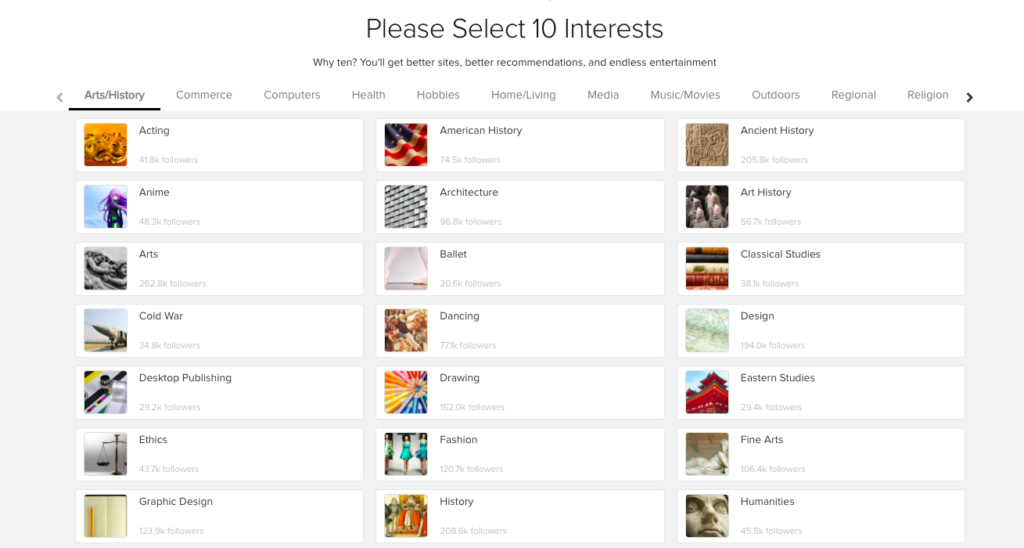
Here are a few tools we use to help keep our outside sources organized:
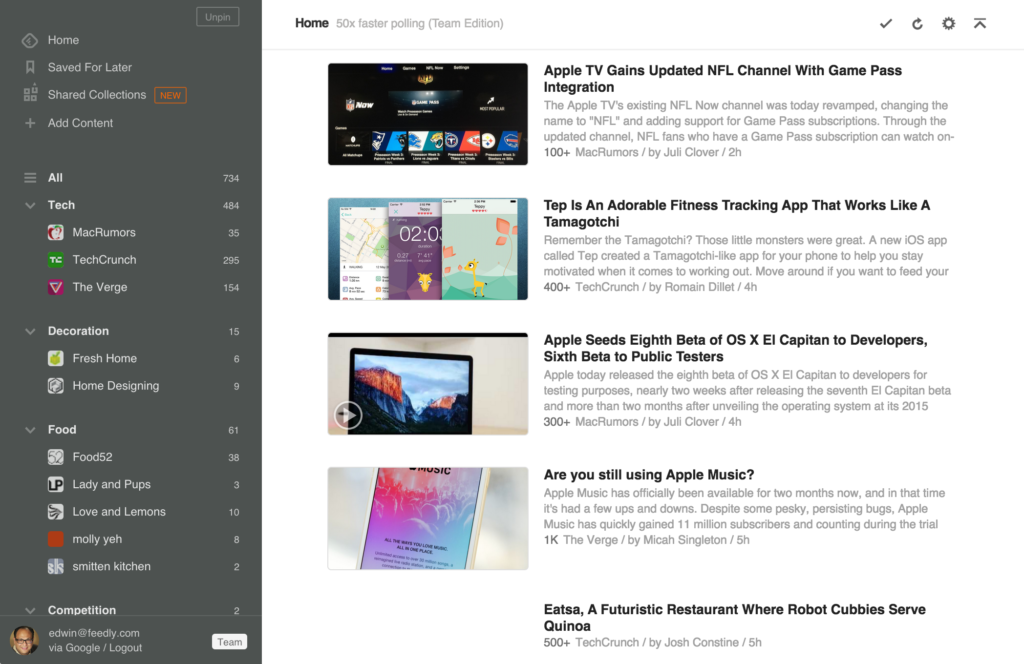
The content you need to accelerate your research, marketing, and sales. Stay ahead of the curve. The content you need to accelerate your research, marketing, and sales.
Discover the best of the web, one click at a time.
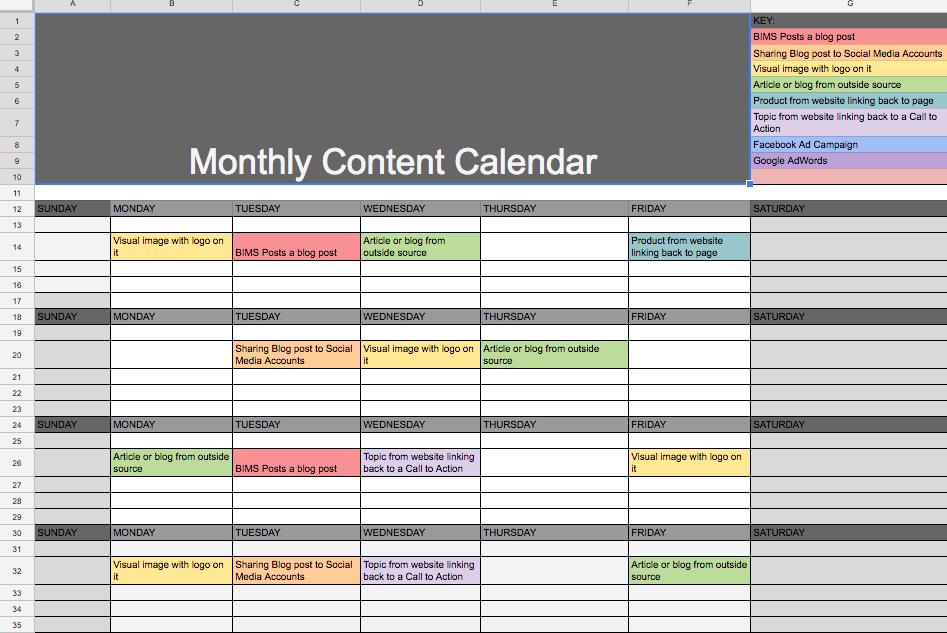
4. Time to fill in your calendar
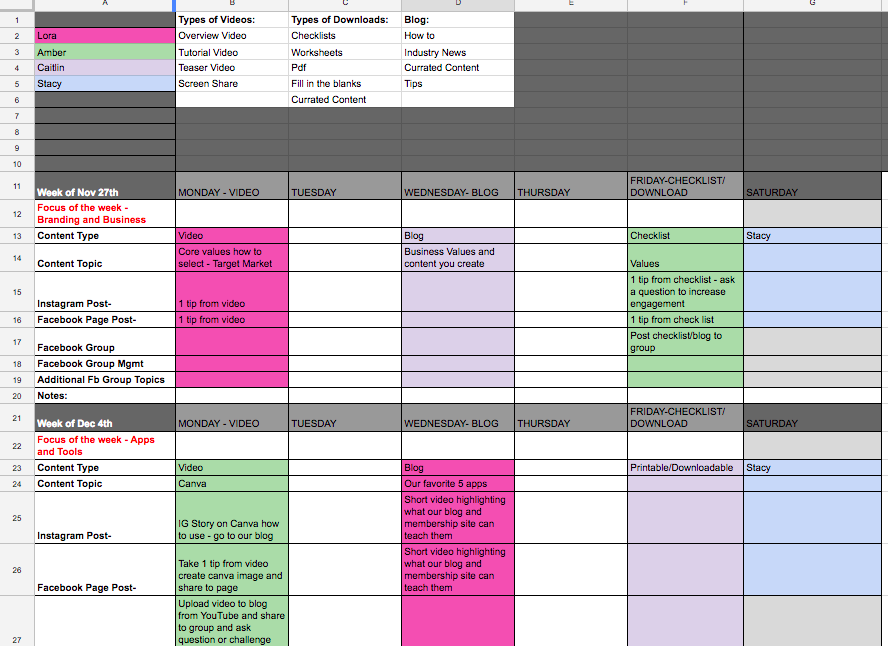
Now that you have put your plan together and figured out the type of content you are going to write, where you are posting it and how often, you can fill out your calendar.
We have found that there are a few tools to help you with that content calendar. Everyone is different, some people like more of a visual calendar and others like more of an excel type of calendar. We love creating the content calendar in Google Sheets then using Trello to write the content and copy from there to our platforms. Others like to use Google Calendar for their topics and then put the posts directly into Buffer or Hootsuite to schedule them at one time to the correct social media networks.
You have to explore each option to see which one resonates with you the best! So we wanted to give you some to choose from:
Trello is a project management tool that’s very popular with bloggers, marketers and social media managers. It’s a good way to keep track of your content ideas and even has an additional calendar add-on you can use to get a monthly view of your planned content.
If you want to keep it simple, you could always just create a new Google calendar for the process and invite everyone on the team to view it. Those teammates could also add all of their own posts and ideas to the same calendar.
Buffer is a new and smarter way to share what you want to share on Social Media. People have called it great names before, like your Social Media Assistant or the Siri of Social Media.
What it does is simple. Posts in your queue will be sent out automatically by Buffer, according to the posting schedule that you put in place.
Select the social account you’d like to customize the posting schedule for, select the Settings tab at the top, and then select Posting Schedule. From here, you can choose which timezone is best for this account and customize the days and times your posts should go out. Select the days you’d like to include and add the individual times you’d like your content to be shared.
Manage all your social media in one place. From finding prospects to serving customers, Hootsuite helps you do more with your social media. Save time by scheduling your social posts. Keep your social presence active 24/7 by automatically scheduling hundreds of social media posts at once, across your social accounts.
https://socialspeaknetwork.com/wp-content/uploads/2022/07/How-to-Create-an-Effective-Content-Calendar-for-Your-Business-1.png12602240Amber Irwinhttps://socialspeaknetwork.com/wp-content/uploads/2018/04/SocialSpeak-Logo.pngAmber Irwin2022-07-06 10:45:522022-07-01 16:41:20How to Create an Effective Content Calendar for Your Business
Social media is an excellent platform for promoting your business and reaching your audience.
With billions of users logging in on their accounts almost every day, there is no doubt that social media can help you grow and scale your brand over time.
But the truth is that having an audience isn’t enough. If you want to grow a fanbase, you need to interact with your audience and keep them engaged. One of the best ways to get the conversation started is by asking questions.
Asking questions will not only help you genuinely connect with your audience, but it can also help you improve your organic reach.
But before we give you a list of social media questions, here are some tips to further pump up your engagement when asking questions.
Ask questions that are easy to answer
This is supposed to be a fun activity, so don’t let your audience think too hard. The easier it is for your audience to answer the questions, the more likely will they participate.
While some may not always engage, but fun and easy questions may encourage people to stop and be interested enough to read the comments.
Make use of visuals
Studies suggest that social media posts with images get 2.3 times more engagement than those without. So if you want to grab people’s attention, we highly suggest that you include a visually appealing image with it. But make sure that it is relevant to your content.
Post when your audience are most active
Just like any other social media content, you want to post the questions when your audience are actively engaging on the platform. Keep in mind, though, that the best time varies from platform to platform. So be sure to do some research.
Choose relevant and on-trend topics
If you’re struggling to find questions to ask your audience, just hop on to Google and do some research. There are also lots of tools available that can help you find trending topics in your industry.
Questions to ask on social media
Just for fun questions
Social media is a great place to ask just for fun question. The answers people give you aren’t really important. What matter most is that you’re
If you were planning a dream vacation where would you be going?
What movie would be the most fun to live in?
If you got offered a reset button for your life would you push it?
What movie have you watched more than five times?
If you could only have one snack for the rest of your life what would you pick?
If you were stuck on a deserted island, what three items would you bring?
What job would your pet have it was human?
What would the title of your autobiography be?.
What weird talent do you possess?
What shows are you binging on Netflix right now?
Business-specific questions
Asking business-related questions is not only a great way to engage your customers, but also helps you get insights from your customers.
If we gave you $100 to spend in our shop, which products or services would you stock up on?
Which do you prefer, [product A] or [product B]?
What kind of [industry] content would you like to learn about?
Do you prefer podcasts, videos, or blog posts?
What’s the #1 thing you struggle with when it comes to [industry]?
What’s one product/service you’d like us to start offering?
What deal would you prefer to get? 15% off or free shipping?
What’s the #1 thing you look for in a [your product or service]?
Would you be sad if we discontinued [product]?
What questions do you have about [product-related topic]?
Food-related questions
People love food. In fact, most people enjoy taking a snap of their food and posting them on social media. Asking food-related question will surely get them talking.
What’s your favorite food?
What’s your specialty dish?
If you could only eat at one fast-food restaurant for the rest of your life, which one would it be?
If you could cook with any celebrity chef, who would it be?
What’s your favorite healthy snack/food?
What’s the most adventurous meal you’ve ever eaten?
What’s the best meal you’ve ever eaten?
If you could only eat one meal for the rest of your life, what would it be?
If you could buy any type of food right now, what would you buy?
What was your favorite food as a kid?
Gratitude-related or motivation questions
More and more people are being drawn to the idea on reflecting on their lives. As such, people are more open to talking about what motivates them, what they’re grateful for, and other positive thoughts. Asking these types of questions are sure to boost your social media engagement.
What’s one thoughtful thing someone did for you recently?
What are you grateful for today?
What’s a difficult lesson that you were grateful to learn?
What’s the nicest thing someone has ever done for you? (Tag that person)
Who is someone that really listens when you talk? (Tag them below)
What was the last thing you got really excited about?
What’s one thing you hope to accomplish this week?
What’s your #1 goal for this year?
What kinds of things motivate you in life?
When was the last time you felt truly motivated
Would you rather questions
Would you rather questions are fun. They’re great for long road trips and are equally as good on social media. You can post them as regular content or post them as stories to drive engagement.
Would you rather be unable to use search engines or unable to use social media?
Would you rather live alone in a beautiful countryside or work hard and live in the city around the people you love?
Would you rather receive a free world tour opportunity or never have to pay for food at restaurants?
Would you rather know all of someone’s darkest secrets or have the ability to read minds
Would you rather travel to the past or travel to the future
https://socialspeaknetwork.com/wp-content/uploads/2022/06/45-Social-Media-Questions-That-Will-Get-Your-Audience-Talking.png12602240Kathlyn Angeles-Timbolhttps://socialspeaknetwork.com/wp-content/uploads/2018/04/SocialSpeak-Logo.pngKathlyn Angeles-Timbol2022-06-22 10:48:502022-06-17 06:28:2245 Social Media Questions That Will Get Your Audience Talking
When Instagram stories were first introduced in 2016, a lot of people thought that it was nothing but a copycat of Snapchat. But with constant innovations and the addition of new features, people started to embrace it. Instagram is always adding new things to them to help make them, even more, user-friendly.
Years later, it seems to have taken momentum against Snapchat and has changed the way people share and consume content on social media.
In this blog, we will be discussing 6 reasons WHY you should be using Instagram Stories to market your business.
Instagram is owned by Facebook, which means their algorithm is going to be similar, the more you use their bells and whistle they offer the higher they rank you. Along with the more people engage in your posts they will see your posts more if you have common interests etc. Before the stories and posts would show up in chronological order, NOT anymore. Most social media platforms are following a similar algorithm to Facebook. They like to think they know who you are, based on interests, likes and engagement so they want to show you the stories and posts they think you will most like. Sometimes, it is crazy how spot-on they can be!
So let’s dive in . . .
#1 – Top of Mind – That is KEY!
We feel like one of the biggest reasons to use Instagram Stories is to be top of mind. It is the first thing people see when they open up their app. Once they see you once up there they are going to be looking for you even more. With Instagram Stories you can give value and keep your tribe coming back for more! The stories only stay up for 24 hours so it is a great way to increase engagement and get your message across. You want to keep your stories relevant and catchy!
Why is it important to stay top of mind? In today’s digital world people are being bombarded with thousands of different things daily, think of all the things you see on Facebook, Instagram, Pinterest, Twitter, not to mention emails, texts, and good old fashion phone calls! If you are not consistent with your online marketing and sticking to a strict schedule you will get lost in the shuffle.
Each time you are posting a story you are giving your brand exposure, you are climbing the favorite list for your target market, and that’s what it is all about . . . being someones favorite, right?!?! Well, it kind of is with social media. People will start to notice that you are posting a story more regularly and that each story you are posting they are liking, they are engaging. They are excited to see what you have in store for them next!
#2 – Create a Strategy and Theme
People love when you are using all the components of Instagram. It’s important to keep your content fresh, get creative with it. Have a story that is a series of quick videos, images, a special offer, funny images. Get creative! One exciting way to use Instagram stories is to start creating a theme with them. Write down 10-15 different ideas for stories, be strategic about them. Maybe they are 10 tips and each story has 2-3 different components to it, like a static image with title, then short video and then call-to-action. you do this for 10 different stories each have your brand color, logo, and a video of you to build your brand.
Stories are real-time, so this is a great tool for your strategy. Stories tend to build engagement and help reach your target audience.
Think of using stories when you are at:
* Live Events
* Networking Groups
* Speaking Engagements
* Behind the Scenes
* Live Sale
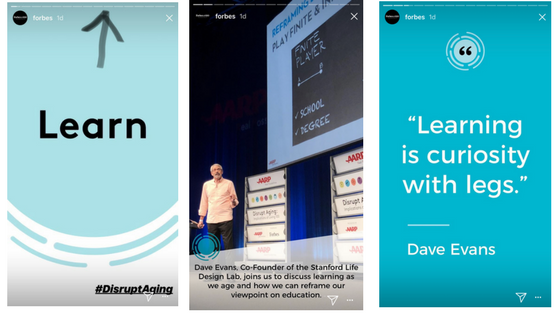
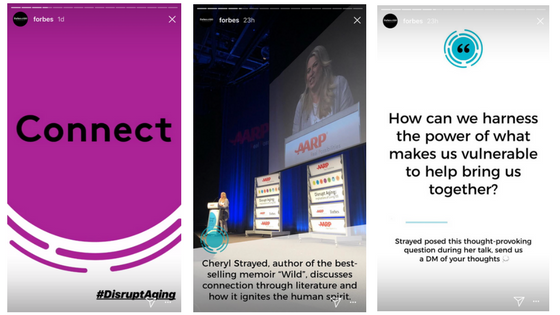
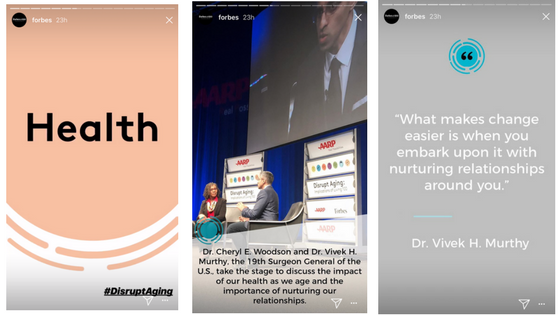
Here is an example of what an AMAZING story would be, Forbes had an AARP event and they put together such a good story. They had branded images for each section of the event, such as Learn, Connect, and Health. They tied in still photos, branded photos, and videos of the event. They also branded the hashtags #DisruptAging. You can see in the first photo there are 15 little white lines, that means there are 15 slides to that story. You can have A LOT of images and videos to one story!
#3 – Let Your Creative Side Show
Instagram Stories are easy, quick and fun! It only takes a couple steps to get up your masterpiece. You can also share those stories on your Facebook page! I want to share a video with you that will show you how to create branded Instagram Templates. I know that everyone loves a pretty Instagram account when their images are all color coded, they have the same look and feel to them. It attracts people more to your feed. Well, why wouldn’t you do the same thing with Instagram Stories? We use Canva to create our brand templates:
Even though Instagram stories are made to be quick and easy you still want them to look good. By working ahead and creating your templates with Canva you are getting ahead of the game like we have said in previous posts, it is so important to be always working ahead. Create a “Story” list, what topics do you want to cover? Create the images ahead of time and save them on your phone, then you have them and can pop them right into Instagram.
#4 – Set Your Standards High
When people come to your Instagram account you want them to think . . . “Wow, they do an amazing job!” Your photos are all branded and you are giving amazing value, your engagement is high, and your stories are great! The only problem with doing stories is they ONLY stay up for 24 hours. Your photos and videos you post to your feed stay forever. That is where step #2 came in with the strategy and theme, once you have these stories and they are offering the value you can highlight them in your profile.
If your story is promoting a special offer like a one-time deal, or talking about an upcoming event that doesn’t repeat on a weekly or monthly basis, those stories are a good story to just leave in “story-land” and let them disappear in 24 hours. They stories like the 10 tips, stories about your products or services, the stories that give that value, those are the ones we want to highlight.
In this video below we will show you how to highlight a story and keep your brand consistent:
#5 – Adding Value to Your Business Profile
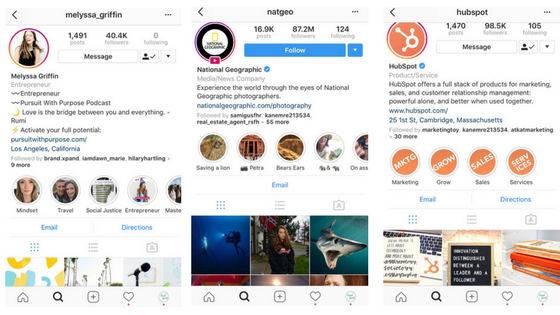
Think of your Instagram account as a mini website, people are going to Instagram all the time to research new products, services, and places before they buy. You want to make sure your business profile stands out. When people come to your profile they see who you are as a brand. What you do, who you are, why you do what you do. When you just put static posts up to your feed they may get lost with the new algorithm, they may not be seen as much as they should, especially if you have lower engagement. By using stories it allows you to keep bumping up in that algorithm, it’s like Instagram is giving you kudos for doing a job well done. You can’t just put a story up once, you have to be consistent. Some brands are putting stories up every day with multiple images and videos. Since you can ONLY have 1 story per 24 hours, each time you add an image or video to your story within those 24-hours it will go to the same story but then you can highlight the images you want from that story to certain highlighted storyboards.
Here are a few examples of brands that have gone above and beyond with Instagram:
#6- Connect with Your Tribe
If you build it they will come… Feild of dreams. You are building your brand to give value to your tribe, you want to give them just enough to keep bringing them back. With over 800 million people engaging in stories each and every day it is so important to use stories to engage with your audience. Get creative and maybe do a live story, have people ask questions and you can answer them with a live story.
There are two ways you can think of your stories:
1) Oh they only last 24 hours so it doesn’t matter on quality, they are quick and fast stories just to get something up every day
OR . . . .
2) Think of your stories as an opportunity to connect. Your stories can be providing value to your audience then you highlight that story. You will have a mix of stories the themed ones with your templates you created and then the live stories, behind the scenes and event stories, which are still important to have, remember it is your brand you are dealing it.
You want a brand that is raw, authentic and transparent! People want to do business with people they know, like and trust! Go to a deeper level with your Instagram account, get to know your audience.
Bonus . . . Topics you can do Instagram Stories On:
Your Goals
Showcase your products and/or services
FAQ – answer those questions your audience has asked
Exclusive Offers and Deals
Ask for people to sign-up for a Newsletter
Behind the scenes
Family Life
Repurpose Blogs
Testimonials and Interviews
Recipes
Podcasts
Events
Trends
Spruce up Your Stories
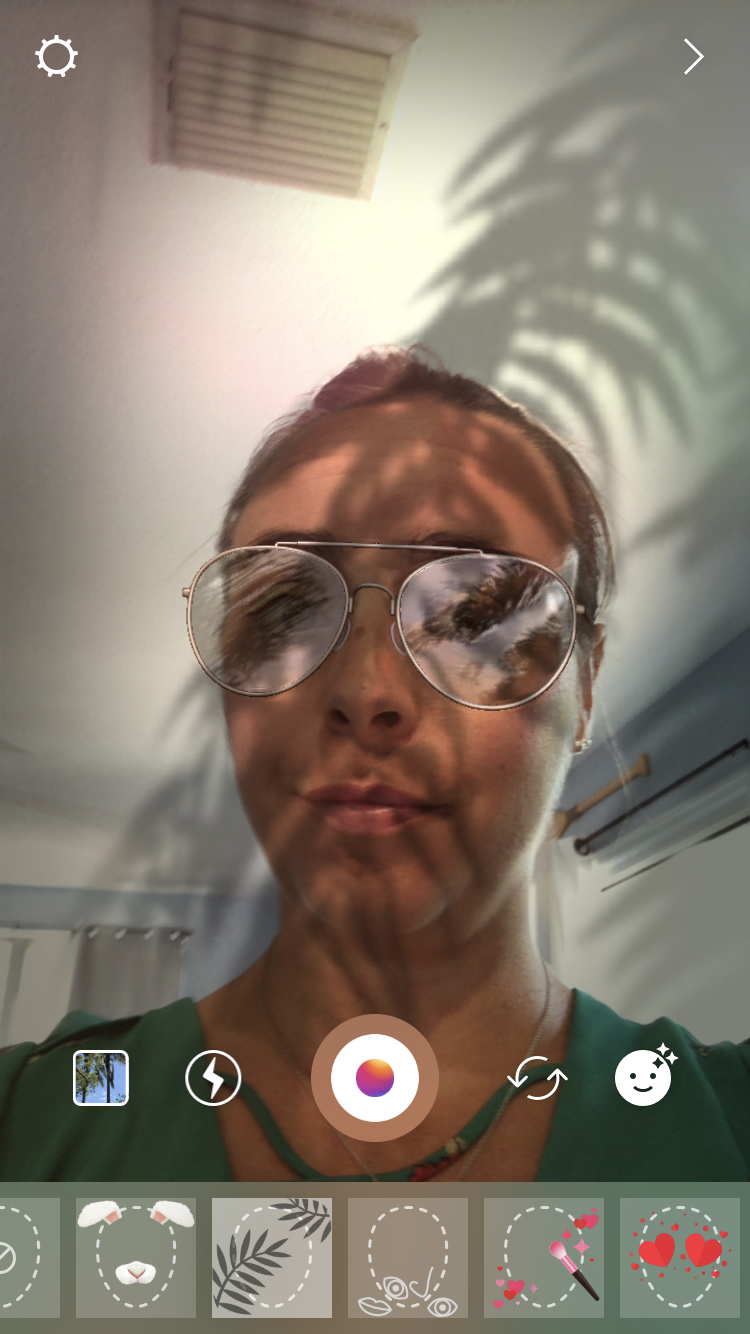
Like I said, in the beginning, use the bells and whistles that Instagram offers the #hashtag stickers, location, dates, emojis, filters etc. Try out the different options they offer the Type, Live, Normal, Boomerang, Focus, Superzoom, Rewind, Hands-Free, and Stop-Motion. These are all cool ways to be creative with your brand. The markup capabilities they have to allow you to create eye-catching images that stick out!
Take advantage of tagging people in your stories as well. Once you reach 10,000 followers you can also add a link to your stories! I think by using Instagram stories it gives your brand more freedom. Instagram is always adding new features, remember to check them out. Here is what they are offering now:
Weather
The current time
Holidays
Days of the week
Location tags
Funny hats and sunglasses
Emojis
What do all the Features Mean in Instagram Stories:
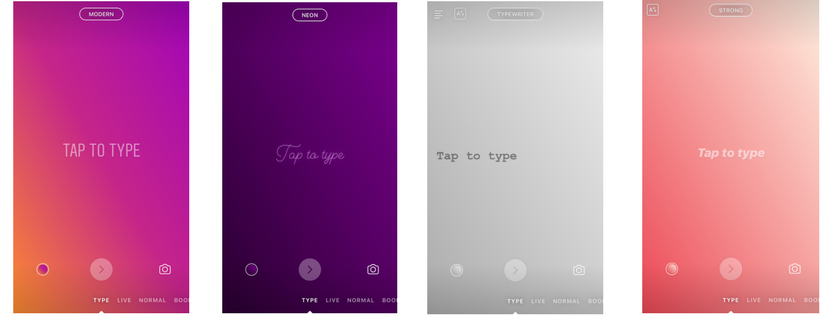
Text – Text is an option where you can tap to type, Instagram has4 different templates you can choose from as far as Modern, Neon, Typewriter, Stong. You can then tap the small circle color icon on the bottom lefthand corner to choose a different color.
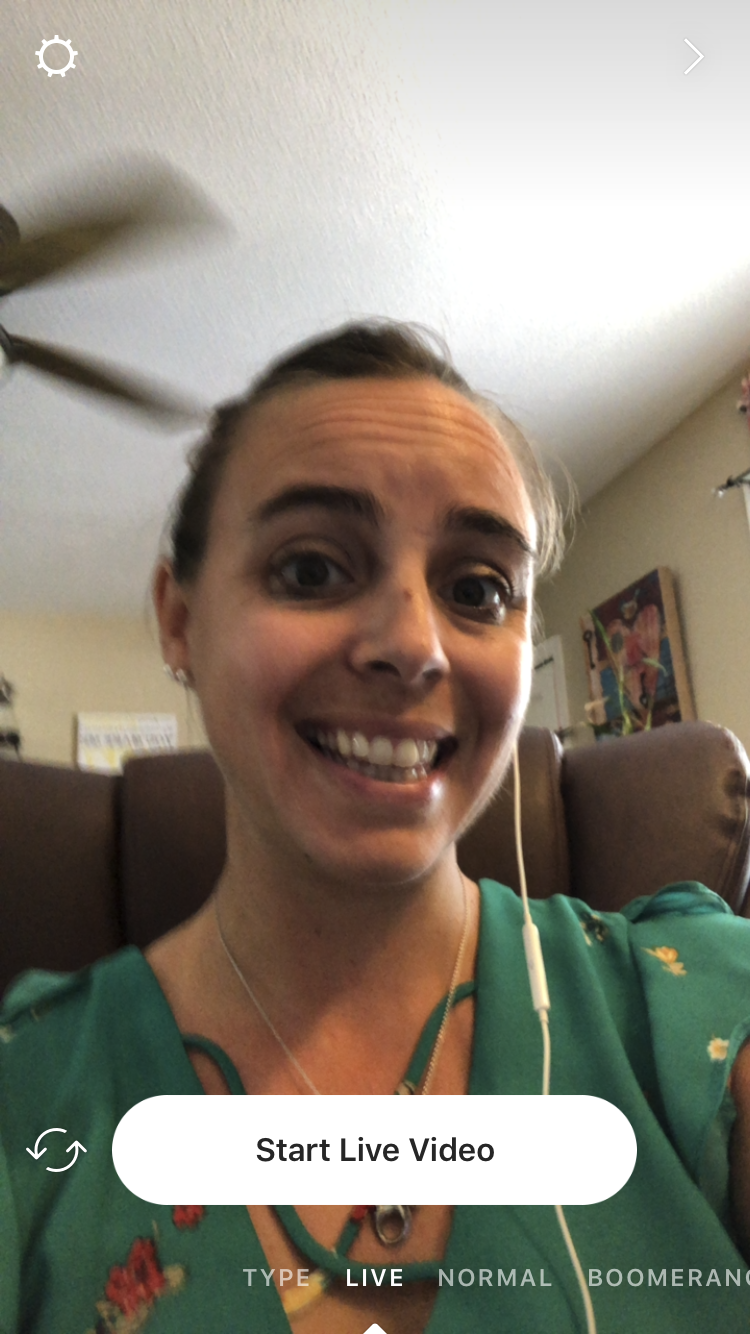
Live – The live option is pretty obvious you are about to go LIVE on Instagram! You can have it in selfie mode or turn it around. Pretty plain Vanilla here.
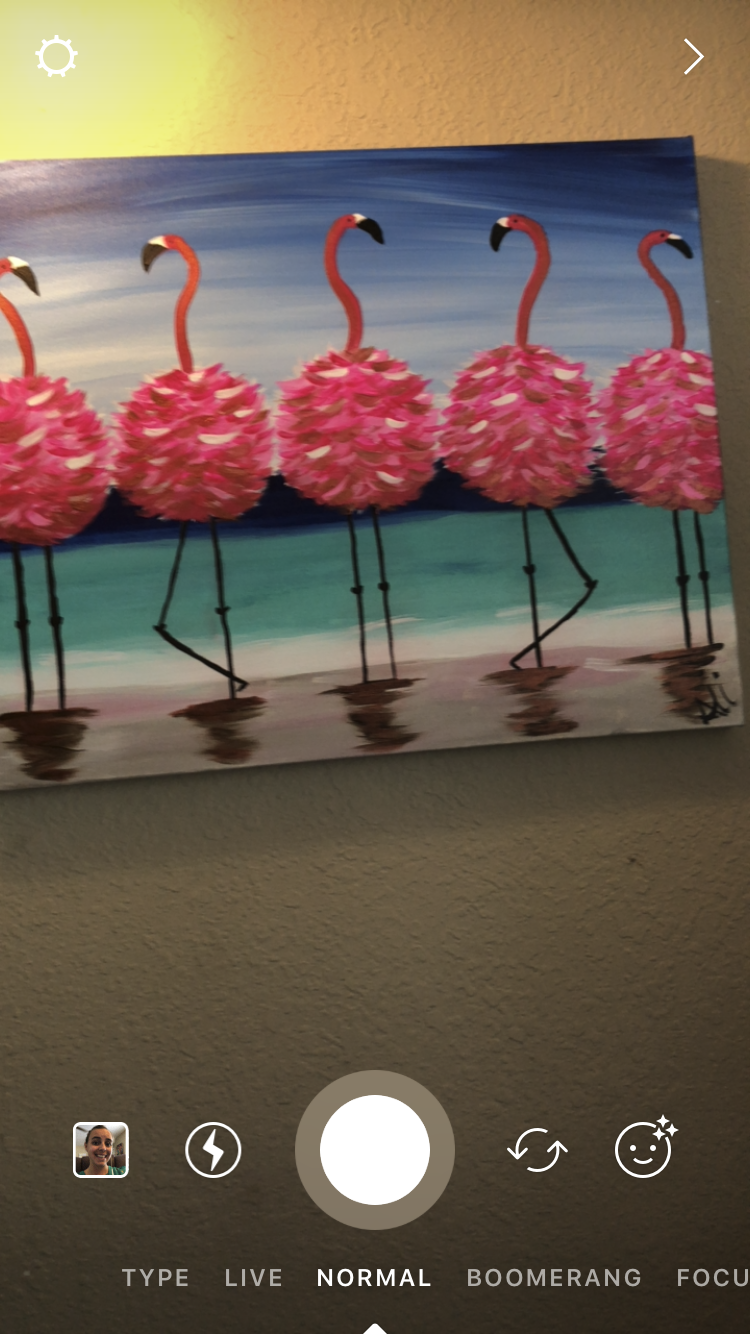
Normal – You can upload a picture or video, also add filters to the pictures you take.
Boomerang – You can now access the “Boomerang” app through Instagram Stories, this is in a way making your own gif. If you take a picture of a high-five or walking your dog, yoga pose, etc it will have that quick segment play over and over.
Focus – This is the NEWEST Instagram story feature. This option allows you to focuses on a subject’s face while blurring the rest of the photo’s background, this helps create that professional look. Great for selfies or products, yup, you can use this feature for front and rear facing camera modes.
Superzoom – This allows you to ZOOM super close up to an object and then is shows that process of moving closer.
Rewind – This plays your story from back to front
Hands-Free – This is great if you are doing a quick video and you don’t want your phone moving because your hand is shaking. You are still holding your phone, but you don’t have to keep holding the button, you can just tap it. It is also fun to try out the filters!
Stop-Motion – Stop Motion allows you to take a series of photos, but you cannot edit them. Once you’re done snapping photos, you tap “done” to see your story-editing tools like stickers and text. From there, you can post the stop-motion GIF to your story.
Wrap-Up
As you can see there are many options and features to try out with Instagram Stories, you can get lost in the creativity alone with these stories. Have fun with it and take your brand to the next level! We would love to hear what stories have worked best for you and which stories you have highlighted! We invite you to follow us on our Instagram account, we ALWAYS follow everyone back that follows us!
We also invite you to check out our FREE Resource page, we offer a ton of checklists to make sure your social media profiles are always at 100%. There is also an Instagram Caption Checklist that can help you craft together those eye-catchy captions to attract your target audience.
Cheers to your Instagram success!
Interested in learning more? Take a look at these articles:
https://socialspeaknetwork.com/wp-content/uploads/2022/06/6-Reasons-You-Need-to-be-Using-Instagram-Stories-for-Business.png12602240Amber Irwinhttps://socialspeaknetwork.com/wp-content/uploads/2018/04/SocialSpeak-Logo.pngAmber Irwin2022-06-08 10:14:342022-06-06 09:19:426 Reasons You NEED to be Using Instagram Stories for Business
Social media remains to be one of the best ways to reach out and engage with your audience. You already know who your target market is and social media platform they’re using. Now, you just have to come up with interesting posts that can get their attention and join on the conversation.
Here are 6 social media content ideas for boosting engagement on your social media pages.
Video content
People love video content. In fact, videos get more shares than photos or plain text contents. It’s no surprise why Tiktok rose to popularity over the last few year.
Go ahead and try to be as creative as you can with your videos. You can share behind the scenes videos, do a product demo, create how-to videos, or host an AMA. The possibilities are endless.
Ask questions
Questions are a fun way to get to know your followers. Plus, it gives you a better understanding of what they want.
You can ask random questions about your industry just to get the conversation started. Or you can ask for your audience’s opinions about your products or services.
While asking questions is a powerful strategy, be sure to use it sparingly.
Fill-in-the-blanks
Fill-in-the-blanks posts is another fun way to get comments and responses from your audience.
Get creative with it, and see what you can come up with. Make sure, thought, that it’s something easy to answer. You can ask about random stuff or get people talking about your brand.
Here’s an example:
Fill in the blank: My favorite thing about [BRAND] is ________.
Trending topics
One of the easiest ways to boost your engagement rate is to post about trending topics. People are already talking about it, so try to join in on the conversation. While this can be a great strategy, be sure to only post about topics that are relevant to your niche.
Tease a new product
Everyone loves being the first to see new products. If you’re planning to launch a new product, try to consistently give your audience sneak peek of the product. Not only can it help generate buzz around the launch, but it also helps boost engagement.
Challenges
People love a challenge, especially when everyone else is doing it. Today, more and more brands are using challenges to engage with their audience and further grow their community.
Challenge your audience to do things, but make sure it runs for a short period only. 5 to 7-day challenges are ideal. Also, make sure that the challenge is easy enough for participants to complete. After all, the goal is to help them gain quick wins.
Final thoughts
Social media marketing can be challenging. It takes time. It requires a lot of effort. But once you find what works best for your audience, you’ll be able to grow your fanbase and build a relationship with them.
If you need help writing social media posts that will capture the attention of your target audience and boost your engagement rate, we’re here to help. Schedule a free 30-minute call with us and we’ll help you fill your social media content calendar with quality posts.
https://socialspeaknetwork.com/wp-content/uploads/2022/05/6-Social-Media-Content-Ideas-to-Increase-Engagement.png12602240Kathlyn Angeles-Timbolhttps://socialspeaknetwork.com/wp-content/uploads/2018/04/SocialSpeak-Logo.pngKathlyn Angeles-Timbol2022-05-25 10:37:562022-05-19 12:38:256 Social Media Content Ideas to Increase Engagement
With the digital space getting saturated by different brands trying to capture the attention of their target audience, social media contests provide an excellent way to generate buzz around their brand and re-engage their audience. When done properly and effectively, social media contests can bring a number of benefits to your brand. In fact, businesses, both big and small, are using this tactic to generate more leads, promote their products and services, and increase brand awareness?
While your brand might not garner the same level of enthusiasm that game shows get, you can certainly benefit from hosting a contest or a giveaway on social media.
Here are 5 reasons why contests should be a part of your
marketing strategy.
Give people a reason to follow your brand
Most brands would share interesting and informative content in the hopes of capturing the attention of their audience. But despite their efforts, many of them are having a hard time standing out from the competition. If you want to have more followers and expand your reach, consider hosting a contest on social media.
When running a contest, most brands would ask people to like their social media accounts and share their content. Knowing that they’ll get an opportunity to win something, most people would gladly do as they are asked. This is a win-win for both the brand and consumers. You get the opportunity to reach more people while they get the chance to win something – a gift, a discount voucher, a gift certificate or a free period of service.
If you’re looking to grow your fan base, contests and giveaways are a great way to do it. We’ve seen brands grow their following from 100 to 1,ooo or 10,000 to 25,000 in a matter of days or weeks. While some may argue that follower count is just a vanity metric, having more followers will certainly be beneficial for you if you can keep your engagement rate high. So don’t just stop at running a contest. Make sure that you keep your audience engaged and you’ll reap all the benefits soon enough.
Improve brand awareness
Most people aren’t aware that your business exists until they hear it from their family and friends. Social media contests allows you to get the word out about your business without directly promoting it.
Regardless of how well established your brand is, contests can be a simple yet effective way to improve brand awareness. If your contest includes a voting component, people would tag their family and friends for support. This strategy helps generate buzz around your brand. People are already talking about your brand and promoting your business on your behalf. People get to join in on the fun. Some even walks away with a prize, and you get to reach a wider audience. It’s a win-win for everyone.
Collect data
Often, people are hesitant to share their information for the fear of identity theft. Social media contests provide an easy way to grow your email list and collect data. People will be more willing to provide you with their personal information, knowing that they get something in return.
You can ask people to leave their name, contact number, and email address to enter the contest. Also, think of the type of information you need for your future marketing campaigns. Want to know how many of them went to the local university? How many of them have kids? Now is your chance to find out.
Increase engagement
Contests are one of the best ways to boost your engagement. When you host a social media contest, your post is likely to get a lot of likes, shares, and comments. It’s a fun and interactive way to get people to interact with your brand.
More than the number of fans and followers, engagement is the most important element in social media. The engagement rate represents the number of people who are talking about your brand. The higher the engagement rate is, the higher the reach rate. That means, your content will be viewed by a wider audience. In addition to that, hosting a contest gives you more opportunity to interact with your audience and deepen the connection as well.
Collect user-generated content
Let’s face it. Most customers won’t leave a review unless you ask them to. And if you’re looking for a way get tons of reviews and user-generated content fast, contests are the way to do it. Simply ask your audience to provide their photos to enter, and you’ll be flooded with user-generated content in no time.
Not only will you have lots of photos to use for your future marketing campaigns, but it will also give your target audience the perception that people love your brand. After all, those who submitted their photos are already invested in your brand.
Why social media contests are a good idea
Holding contests and campaigns
on social media is more popular than ever, and we don’t see that changing anytime soon. Any company can give out free gift cards or electronics, so that really is not enough to hold the attention of social media users anymore. What is taking your contest to the next level? If you are running a contest, you must make sure your contest stands out from the rest.
As we know, consumers are constantly interacting with social media on their mobile phones. This means it is vital to take advantage of location. Urge users to check-in on social media when they are interacting with your company’s physical location. Offer some sort of incentive such as a discount, a charitable donation, a few points in a contest, etc. Getting social media users to check in not only allows you to generate more traffic but also creates a deeper user interaction (physical and digital).
Do your users have a reason to keep coming back to your page? Include your fans and contest participants in every possible step of the contest. Brands often do this by allowing the fans to vote on a winner, respond to a question, or answer a poll. Get creative here and choose what seems most relevant to your brand and product.
Although your contest is Facebook based, ask yourself if other social media platforms would enhance your contest. For example, say you are the marketer for a line of gluten-free butter and your Facebook contest asked users to post pictures and recipes of things they made with your butter. In this case, it would make sense to start a Pinterest board, displaying the recipes. Using more than one social media platform can allow you to reach a larger audience. The key here is to make sure your second social media platform is relevant to your contest.
The general goal of Facebook contests is to allow users to interact with your brand. Anybody can make a Facebook contest, but your goal is to expand that user interaction as far as possible. Think of ways to take your contests to other social media platforms, physical locations, and beyond.
https://socialspeaknetwork.com/wp-content/uploads/2022/05/5-Reasons-Why-Social-Media-Contests-Should-be-a-Part-of-Your-Marketing-Strategy.png12602240Caitlin McDonaldhttps://socialspeaknetwork.com/wp-content/uploads/2018/04/SocialSpeak-Logo.pngCaitlin McDonald2022-05-11 10:46:352022-05-06 09:10:145 Reasons Why Social Media Contests Should be a Part of Your Marketing Strategy
If you think of Tiktok as a platform for teens and Gen Zs sharing their dance routines, funny lip-syncing videos or cute animal videos, think again. The truth is, there is a wide variety of content niches and communities within the platform, which allows you to reach a diverse audience.
No matter what type of business you have, there’s a space for your brand to make its mark on the platform. In fact, it is now seen as one of the biggest marketing machines for businesses of all sizes.
Tiktok has over 1 billion monthly active users, and the numbers seem to be rising day by day. It looks like Tiktok is here and doesn’t seem to be going anywhere
Looking to start using Tiktok to promote your brand? Here are 5 tips to help you get started.
Have fun!
Tiktok’s nature is fun, playful, and casual. So if there’s one thing you shouldn’t do on the platform, it’s being boring.
Most people are on the app to discover new and exciting content. So show off your brand personality and have fun with your content. If people see that you’re enjoying creating your content, chances are they’ll enjoy watching your videos too.
Tiktok is a great platform to test out new ideas and a different side of you. Feel free to explore different content formats until you find one that resonates with your audience. Once you do, keep replicating it to build on your success.
Post often
Let’s face it. Growing your brand on Tiktok can be exhausting, especially when you’re just starting out. Sure, it only takes one video to go viral to make a mark on this billion-dollar platform. But most of the time, success doesn’t happen overnight.
There are millions of videos that are being published on a platform everyday, and it can be quite difficult the capture the attention of your audience. If there’s one thing successful Tiktokers have in common, it’s consistency. They post content every single day; sometimes more.
So if you find yourself getting frustrated and you’re still not seeing the results you want, be patient. Post often and consistently.
Watch out for trends
One of the best ways to get more views is to create videos on trending topics. Keep in mind, though, that trends come and go. So if you want to capture the attention of your audience, you’ll have to keep up with the trends and keep your content new and refreshing.
Most users are actually searching and watching content about trending topics, so your videos will be shown to a wider audience.
With Tiktok, you’ll never run out of ideas for your content. Just do a quick search of the most trending hashtags, watch some videos on the platform and you’ll have a long list of ideas for your content.
Social media challenges
Social media challenges are a big hit on the platform. Some videos even go viral. So if you’re looking to increase brand awareness and grow your following on Tiktok, you might want to consider joining in trending challenges.
But if you’d like to take it a step further, you can also create your own challenges and encourage people to join in on the fun. It has to be fun and easy for your target audience to complete. Otherwise, people may not be interested to participate.
It’s also a good idea to create a branded hashtag for the challenge. Be sure to do some research before creating a hashtag to make sure that it’s hasn’t been taken yet.
Run Tiktok ads
For your ads to work, your target audience must be fully engaged within the platform. And that’s one of the biggest benefits of Tiktok. Users can’t get enough of it.
In fact, the usage of Tiktok is on an upward trend, with the average users spending at least an hour a day watching, sharing, and creating videos on the platform.
The more time users spend on the platform, the higher the chance that they’ll see your ads. The more engaged they are, the better your ads will perform. This makes advertising on Tiktok more worthwhile.
Final thoughts
A lot of businesses have found success on Tiktok. It’s not just because of the fun, entertainment, and creativity it offers. But because the exposure is truly next level. In fact, it opens a whole new connection with your target audience.
If you find Tiktok intimidating or you think it’s already too late to get in, it’s not. Tiktok is new enough for you to get in, yet huge enough to ensure that you’ll be able to reach a wide audience.
https://socialspeaknetwork.com/wp-content/uploads/2022/04/5-Ways-to-Use-Tiktok-to-Promote-Your-Business.png12602240Kathlyn Angeles-Timbolhttps://socialspeaknetwork.com/wp-content/uploads/2018/04/SocialSpeak-Logo.pngKathlyn Angeles-Timbol2022-04-27 10:58:192022-04-25 11:45:305 Ways to Use Tiktok to Promote Your Business
One of the best visual tools to use on Pinterest is Infographics. Over the past few years, infographics have become a big deal. They are a great way to visually explain data to people. Not only are they easy to follow and digest, but they are also a powerful tool for capturing the attention of your target audience, teaching them some tips and tricks, and sticking with them long after they’re out of sight.
Let’s face it. Infographics just look at home on Pinterest. Be in on mobile or desktop, there is no denying that they fit perfectly on the Pinterest feed. And now, you’ll find thousands and thousands of infographics on the platform. So if you’re on those people or brands that are sharing infographics on Pinterest, then you’ll have to find a way to stand out. Otherwise, yours will be lost in the sea of content.
People can get too caught up in making an infographic, what data do you use, where do you find that data, how do you create the image, what colors do you use, etc. The list goes on and on.
We have created a 5 step system for you to follow to create the BEST infographics for Pinterest!
1 – Picking the right topic
Does it relate to your business?
What topics in your industry do people find interesting?
Is this topic something you are passionate about?
What data do you want people to receive?
Can you tell a story within the graphic?
2 – Be creative, funny, or useful
Can you get a reaction out of people?
Explain something to your audience that will resonate with them
Explain the data you want them to learn on their level
Will your image be shareable?
3 – Keep it simple
Have a simple and clean image
Keep your infographic to 3-5 points
Using text and images within your infographic
Have a good Call-to-action within the graphic, don’t give it all away in one image
4 – Look and feel
Make sure you are using clear fonts that your audience can read
Tie your infographic into your brand colors only use 2-3 colors per image
Put your sources on the bottom and your logo
Keep your infographic consistent with your brand
5 – Sizes and dimensions
Vertical is the way to go in terms of pins. Make your image longer rather than wider
The best dimensions for infographic Pins on Pinterest are 1000 x 3000 with a Pinterest Pin ratio of 1:3
Infographic pins should be no larger than 600 x 2400 pixels. Otherwise, they’ll get cut off.
Wonderful, now you know how to create your infographic, what it needs to look like, the things you should have and shouldn’t have, but now the BIG question is where do you get all the data?? I know as an entrepreneur I am always looking at infographics on Pinterest for our company and for our clients, I say WOW that is awesome, I want to create something like that. BUT where did they get the data, how do they know the key points they want to talk about??
As you can see there is a lot that goes into making just ONE image, right? This is a process. It’s really about finding that perfect topic that you really want to share with the world and being able to explain it in such a way that everyone gets it! You have to do your research with each infographic, make the process fun. As you think of these ideas for your infographics, keep a journal or word doc to start collecting your data.
Lastly, you may also want to consider Pinterest SEO. Not only will it help you drive more traffic to your website, but it will also help you improve your reach and ensure your pins are getting maximum results.
Conclusion
Remember you are always going to analyze your data and try to create a story with that data. Once you have your data, story, and image complete you can craft together a successful launch. Where will you place this image first? Each infographic needs to have your call-to-action, visually appealing, and clearly branded. Here are a few steps we recommend for a successful launch:
Write a blog post about your Infographic with the image within the blog content
Share to Pinterest, Google, Facebook
Make another image that is the correct size for Instagram and share it on Instagram
When you follow these steps to create the best infographics and implement our techniques in your data and design process you will be able to deliver an infographic that will resonate with your audience. An image that they will want to share and will build your brand.
If you need a hand in creating Pinterest infographics that stand out or need help with Pinterest marketing, please feel free to schedule a free 30-minute consultation call with us.
https://socialspeaknetwork.com/wp-content/uploads/2022/02/How-to-Create-the-Best-Infographic-for-Pinterest.png12602240Amber Irwinhttps://socialspeaknetwork.com/wp-content/uploads/2018/04/SocialSpeak-Logo.pngAmber Irwin2022-02-16 10:39:352022-03-28 10:17:55How to Create the Best Infographic for Pinterest
Pinterest is a visual social network, so you might think that SEO doesn’t play much of a role here. I mean, nobody actually comes to Pinterest to search for content, right? After all, pinning stuff is what Pinterest is all about! But it turns out that Pinterest has a lot of SEO potential.
In fact, Pinterest users love to share links! When creating compelling boards and pinning tons of great stuff, you’re also sending traffic to your website.
Tons of businesses use Pinterest to drive more traffic to their website, but it’s not just about pinning pretty pictures. If you want your Pinterest pins to rank well in search engines, you need to make sure you’re doing SEO correctly.
So how can you use Pinterest for SEO? Read on!
Do keyword research to give you an idea of what users are looking for
Using the right keywords can help your content reach the right people. So before you get started, it is essential to do keyword research. Create a list of the top keywords in your niche, and use them to inspire your content calendar.
Recipes are a huge hit on Pinterest. Let’s say you’re a nutritionist or a blogger who focuses on healthy living. You might want to create recipes related to the keywords you found.
If you’re a fashion blogger or a clothing retailer, take note of the keywords related to your niche and then create different boards and pins for each season.
Optimize your Pinterest boards
You can optimize your boards by making sure they’re relevant to your blog content or business. So that when someone searches a particular topic, they will find you.
When optimizing your boards, be sure to use keywords that people would search for to find the pins associated with them. Also, make sure you have at least three boards with lots of pins on them. The more boards you have, the more traffic you will get from Pinterest.
Write thoughtful pin descriptions
Including detailed descriptions can help your pins perform better. This, in turn, can help improve your reach and improve your pins’ SEO rankings.
If your Pinterest content isn’t optimized for pinner’s searches, then you’re missing out. You have 500 characters for your descriptions, so make the most out of it. Provide some helpful information about your pin. Give your audience a preview of what they’ll get from your content: what they’ll learn, how it would benefit them, and a call to action. These small bits of information may be just what they need to click through to your site.
If possible, include long-tail keywords in your description. They perform better than single or 2-word keywords since they describe what people are looking for. Just be careful not to overdo it. Google hates it when you stuff keywords into your descriptions, and you’ll likely be penalized for it in search engine rankings.
Use keywords as hashtags
Even though hashtags are optional on Pinterest, they are still considered beneficial. For one, they help users quickly find the content they are looking for. Plus, it helps you quickly get your pins to the top of the search results page.
Only include relevant words and phrases that describe the content in the pin. Avoid using popular but irrelevant hashtags to get people’s attention.
While Pinterest allows users to use more than 20 hashtags per pin, we advise that you limit your hashtags between 2 and 8. Having too many hashtags will make your pins look spammy.
Optimize your website for Pinterest SEO
Linking your website to your Pinterest account is an excellent step towards a better SEO performance.
You can use Pinterest tags to determine what types of Pinterest content deliver the most traffic to your website and what kind of content isn’t working. Plus, it gives you an idea of what people are doing on your website after interacting with your pins. The data is collected and sent back to your Pinterest account, so you can use it to adjust your strategy accordingly.
It’s also a good idea to add share buttons to your product pages. This allows visitors to pin items from your website to their boards.
Final thoughts
Pinterest is a great way to connect with your target audience. It’s visual and social, so it lends itself well to highlighting your content or promoting your products. Whether you’re a blogger, an artist, or a retailer, you can use the platform to drive traffic back to your website and gain followers in the process.
Pinterest may seem intimidating at first, but once you get the hang of it, you’ll realize that it’s easy to navigate. If you need help with Pinterest marketing, please schedule a free 30-minute consultation call with us. We’ll help you leverage Pinterest SEO to ensure your pins are getting maximum results.
https://socialspeaknetwork.com/wp-content/uploads/2022/02/Pinterest-SEO.png12602240Kathlyn Angeles-Timbolhttps://socialspeaknetwork.com/wp-content/uploads/2018/04/SocialSpeak-Logo.pngKathlyn Angeles-Timbol2022-02-02 10:19:032022-01-28 10:37:59Pinterest SEO: 5 Tips to Make Pinterest Work For You
It’s important to think of Pinterest as a search engine, not just a social media platform. This means that people use Pinterest to find things they’re interested in, like your blog posts. Similar to a search on Google.
Pinterest is a great way to drive traffic back to your website and grow your blog’s brand.
Here are 5 reasons how using Pinterest as a blogger can help improve your blog’s SEO, bring in more traffic, and grow your audience.
Pinterest is a visual search engine –
People visit with the goal of reading and saving pins in mind. When you pin something from your blog, make sure to add keywords in the title and description so pinners can easily find it. For example, if you write about travel tips, you could use keywords like “travel tips” and “vacation ideas” when you pin. Also, remember to use hashtags, this helps tell Pinterest what that pin is about and allows pinners to find pins. Consistency is key. It’s important to be consistent with your pins. If you only pin a few times a month, people will lose interest and won’t follow you. Try to pin at least once or twice a day to see the best results. You can create templates in Canva where you can easily swap out the text and the images while staying consistent with your brand. This allows you to use those keywords and tips at the text overlay and have eye-grabbing images that make your audience want to click on your image and go to your website.
Utilizing Group Boards –
You may join groups where you can share comparable material. Group boards are a great way to increase blog traffic because they allow your pins to be seen by more people. When you join a group board, make sure that the topics of the pins on the board fit with your blog content. If you have a travel blog, for example, it wouldn’t make sense to pin recipes on a group board about fashion. Be sure to follow the rules for each group board, most of the time you will find those rules in the notes section.
Pinterest allows you to be creative with your pins –
You may use your SEO abilities and hashtags to target people who are interested in your pins on Pinterest. When you’re creating pins, make sure they are eye-catching and include text overlays that describe what the image is about. This will help the pinner understand what your pin is about without having to click on it. For example, if you have a blog post about how to pack for a trip, you could create an image with the title. Pinterest also allows different types of pins, you can create animated video pins, video pins of you giving quick tips, or even pin your Instagram square images. Rich Pins make it easier for users to get information from a website by displaying metadata right on the Pin itself. When a user saves content with metadata on your site, it will become a Rich Pin. There are four different types of Rich Pins: app, article, product, and recipe Pins.
Drives traffic to your website –
When someone pins one of your blog posts to their board, they’re essentially sending people to your website. This is a great way to increase traffic and grow your audience. Make sure the images you pin are high-quality so pinners will want to click on them. Going back to the consistency, this is where a tool like Tailwind comes into play, this allows you to pin up to 200 images per week to your boards and even Tailwind Communities. Each pin you put up should have an SEO-friendly title and description with a link directly back to the blog post. You can then monitor your Pinterest Analytics and your Google Analytics to see where the traffic is coming from. For each blog you post on your website, you should create 10-15 images per blog to pin to Pinterest.
Time Efficient Tools –
Tailwind is a service that works with Pinterest to help you manage your time and drive more visitors to your website. I was hesitant about this purchase for some time. I expected to just look into the free trial and then cancel, but once I started using it, I couldn’t stop. Tailwind is a social media scheduling software that delivers real results in less time. Boost the effectiveness of your social media marketing efforts! Decide when to post on social media and how much engagement you want. A few bonus tips, you can use Tailwind to schedule to Instagram as well, you can also link your Instagram to Tailwind and post your images from Instagram to different boards on Pinterest. Tailwind will also allow you to create loop pins, these are great for your evergreen content that will always serve value to your audience, you put those pins in a certain loop that pins to the boards you want and over time it will automatically pin those out for you at the best times and days! This is a life-saving and time-saving tool! A must-have!
If you are ready to work with a team to do the leg work for you, meaning, create the images, pin them, write the description, and more, we are your team! We just launched a new blogger marketing program to help take items off your plate to give you as a blogger more time to write and less time worrying about creating images and social media strategy. Schedule a FREE 30-minute consultation today and let’s start increasing your website traffic!
https://socialspeaknetwork.com/wp-content/uploads/2022/01/Wondering-if-Pinterest-is-worth-your-time-as-a-blogger.png12602240Amber Irwinhttps://socialspeaknetwork.com/wp-content/uploads/2018/04/SocialSpeak-Logo.pngAmber Irwin2022-01-26 06:00:232022-01-25 16:42:54Wondering if Pinterest is worth your time as a blogger?